
Most of us spend way too much money on SEO tools that basically just guess what people are doing. We stare at dashboards, pay for “premium” data, and hope for the best, yet the most accurate data is sitting right in front of us for free.
Why guess when you can just ask the source? If you aren’t prioritizing Keyword Research with Google Search Console, you’re essentially trying to bake a cake without knowing what’s already in your pantry.
Google Search Console (GSC) is the only place to find the “first-party” truth like the actual search queries people typed before landing on your site. Unlike third-party tools that estimate traffic based on crawlers, GSC provides direct insights into actual impressions and real-time user behavior.
In 2026, with the rise of AI Overviews and shifting search habits, this data is no longer just “nice to have”; it is your survival kit. It allows you to identify long-tail keywords and content gaps that automated tools often miss, giving you a distinct advantage in a crowded market.
Ultimately, using GSC for your SEO strategy in 2026 is the difference between shouting into a void and having a real, data-driven conversation with your audience. It transforms raw data into a roadmap for 1st page rankings by showing you exactly what your users need.
Google Search Console Advantage in 2026
You know what? Most people just check their total clicks and then close the tab. That is a massive mistake. When you start doing Keyword Research with Google Search Console, you’re looking for the stuff that isn’t obvious.
Why GSC is the only “first-party” data source you can trust
Think of third-party tools as weather apps. They give you a good idea of the forecast, but they aren’t actually standing outside your house.
Google Search Console is the ground truth. It doesn’t use crawlers or clickstream data from third-party browsers, it pulls directly from Google’s internal servers.
If someone types a query and sees your site, it’s recorded. No estimates, no “volume ranges,” just cold, hard facts.
The shift from “Search Volume” to “Actual Impressions”
Here’s the thing about “search volume” numbers you see in other tools. They are often months out of date. In 2026, search trends move at the speed of light.
Keyword Research with Google Search Console focuses on “Actual Impressions” like the number of times people actually saw your link in their search results.
This is a far more reliable metric because it accounts for seasonality, local trends, and even those weird, one-off viral moments that traditional tools completely miss.
How GSC data helps you rank in AI Overviews and traditional SERPs
You’ve probably noticed that search results look different now. AI Overviews take up a lot of space. But here’s a secret: those AI summaries are built on the same “entities” and queries that GSC tracks.
By analyzing the specific, long-tail questions in your GSC reports, you can see exactly which conversational terms the AI is rewarding. It’s like having a cheat code for Generative Engine Optimization (GEO).
Why to do Keyword Research with Google Search Console?
I know what you’re thinking. “I already pay for Ahrefs, why do I need this?” Let me explain.
Zero-Cost Insights: Professional data without the expensive tool price tag
Let’s talk about the money. SEO and GEO tools are getting expensive. While those paid platforms are great for spying on your competitors, GSC is completely free.
You get unlimited access to your own data without a monthly subscription. For a small business or a solo creator, this is a game-changer. Why pay to see your own rankings?
Accuracy: Seeing what users actually type to find you
Accuracy is the name of the game. Other tools might tell you a keyword has “500 searches a month,” but GSC might show you that you’re getting 2,000 impressions for it.
Why the gap? Because people type in a million different ways. GSC captures the typos, the slang, and the weird phrasing that real humans use.
It’s like being able to get inside your customer’s brain like you see the words they use, what they are looking for, and how often they appear.
The “Secret Sauce”: Identifying keywords that third-party tools miss
Third-party tools often filter out low-volume terms to keep their databases manageable. But in 2026, the “long tail” is where the conversions happen.
By doing Keyword Research with Google Search Console reveals those “diamonds in the rough” and ultra-specific queries that might only get 10 impressions but have a 50% click-through rate.
Your competitors aren’t even looking at these because their tools don’t show them. That is your competitive edge.
The 5-Step Master Process for GSC Keyword Discovery
Ready to get your hands dirty? Let’s break down the workflow that Zumeirah use for daily basis.
Step 1: Discover What You’re Already Ranking For
First, navigate to the Performance report in your GSC dashboard. This is your home base.
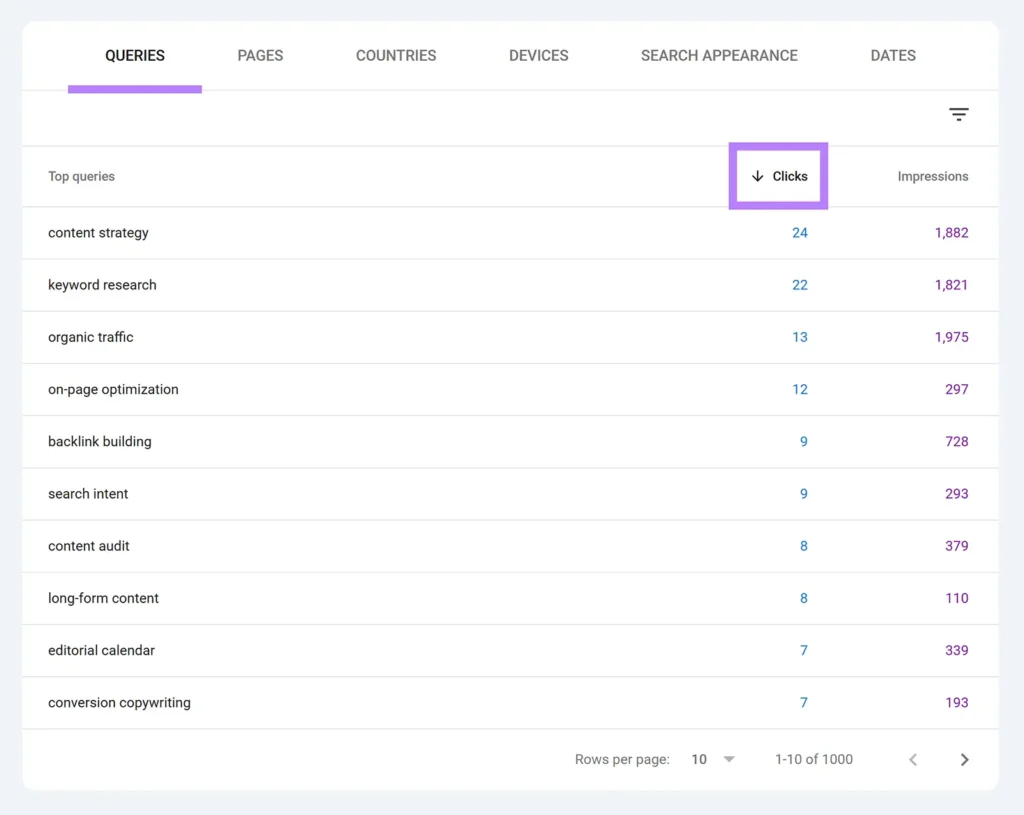
- Navigating the Performance Report: Switch on all four boxes at the top: Clicks, Impressions, Average CTR, and Average Position.
- Identifying “Seed” keywords: Scroll down to the “Queries” table. Sort by impressions (highest first). These are your “seed” keywords and the topics Google already thinks you’re an authority on. Even if you aren’t getting clicks yet, the high impressions mean you’re in the game.
Step 2: Find New “Gap” Topics for Your Blog
This is where the magic happens. We’re looking for things you rank for “by accident.”
- Mining high-impression/low-click queries: Look for queries with 1,000+ impressions but zero or very few clicks. This usually means you’re ranking on page 3 or 4 for a topic you haven’t actually written about yet.
- Using the “Queries” report for questions: Filter your queries using a RegEx to find question-based terms (who, what, where, why, how). These are literal content ideas. If people are asking “how to fix a 401 error” and landing on your general “WordPress tips” page, you need to write a specific guide for that error.
Step 3: Identify & Filter Irrelevant Keywords
Not all traffic is good traffic.
- Spotting “Vanity Traffic”: Sometimes you’ll rank for terms that have nothing to do with your business. If you’re an SEO agency and you’re ranking for “Best Web Designer in Dubai,” that traffic won’t convert.
- Cleaning up your data: Identify these irrelevant terms so you can ignore them in your reports or adjust your content to be more specific. It keeps your strategy lean and focused on high-intent terms that actually pay the bills.
Step 4: Track Overall Keyword Performance
Don’t just look at today’s data. Look at the trends.
- Monitoring “Average Position” trends: Is your ranking slowly climbing or falling off a cliff?
- Custom date comparisons: Use the “Compare” tab to look at your performance over the last 3 months versus the same period last year. This helps you spot seasonality like how “SEO guide” might peak in January when everyone is setting new goals.
Step 5: Monitor and Adjust Regularly
Search Engine Optimization is a garden, not a statue. You have to weed it.
- The Monthly GSC Audit: Set a calendar reminder. Every month, look for new queries that have popped up. These are the first signs of new trends. If you catch them early, you can update your content before the rest of the world catches on.
Advanced Strategies for 1st Page Rankings
Let’s move past the basics and talk about how to actually win those top spots.
The “Striking Distance” Strategy (Quick Wins)
This is my favorite tactic because it’s so fast.
- Finding keywords in positions 11–20: Filter your queries to show only those with an average position between 11 and 20. These are your “page two” keywords. You’re so close to the first page you can almost taste it.
- Action: The Push to Top 3: How do you push these up? Usually, it’s not by writing more content. It’s by improving what you have. Add internal links from your high-authority pages using the target keyword as anchor text. Update the post with a few fresh 2026 statistics or a new FAQ section to satisfy the latest search intent.
The CTR Gap Fix
If thousands of people see your link and nobody clicks, you have a “broken” storefront.

- Identifying the Gap: Look for high-impression keywords with a CTR below 1%.
- Optimizing to “steal” clicks: Rewrite your Meta Titles and Descriptions. Use power words like “Proven,” “Step-by-Step,” or “2026 Guide”. Make sure your title actually answers the searcher’s question instead of just being a generic label.
Mobile-Specific Opportunities
In 2026, mobile-first indexing is the standard.
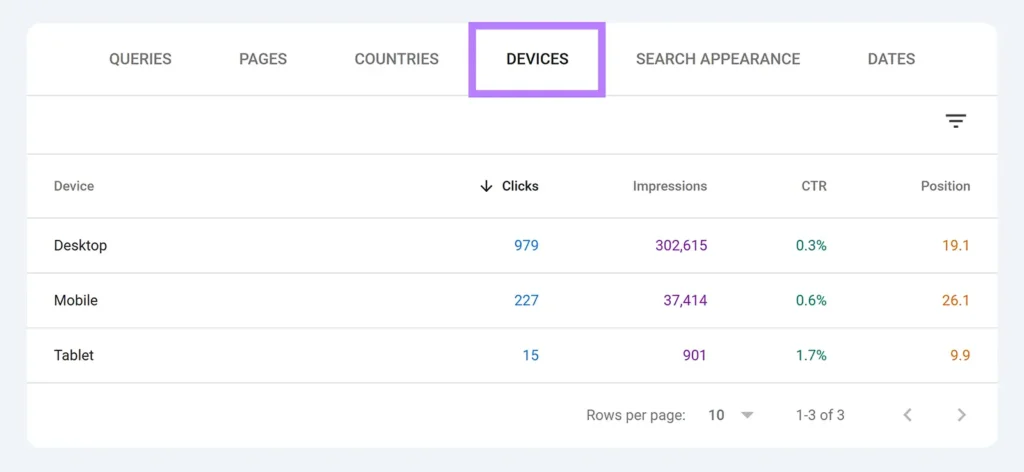
- Using the “Device” filter: Filter your performance report by device. You might find you rank #3 on desktop but #15 on mobile. Why? Maybe your page is slow, or your buttons are too small for a thumb. Fix the mobile experience, and you’ll see your rankings jump.
International SEO & Geo-Targeting
Are you accidentally popular in Australia?
- The Country Report: Check which countries are driving your traffic. If you see a lot of impressions from a region you aren’t targeting, you can “International Target” that country in GSC settings to help Google show your site to more people there.
Taking Action: From Data to SEO Wins
Data is just noise if you don’t act on it.
Using GSC Insights (The 2026 Interface)
If the main Performance report feels overwhelming, use the “Search Console Insights” view.
It’s a simplified dashboard that tells you which content is trending and how people are finding you in a much more readable way. It’s perfect for a quick Monday morning check-up.
Prioritizing Your Opportunities
You can’t fix everything. Start with the “Striking Distance” keywords that have the highest commercial intent. If a keyword brings you leads, it’s worth more than a keyword that just brings you readers.
Boosting with External Tools
GSC is the best for your own data, but it won’t show you what your competitors are doing. Use a tool like Semrush or Ahrefs to supplement your Keyword Research with Google Search Console.
Use GSC to find your “seed” ideas, and then use Semrush to see how your competitors are ranking for those same terms.
Frequently Asked Questions: Mastering GSC Keyword Research
You know what? Even with a solid guide, some specific questions always pop up when you’re staring at a dashboard full of data. Here are the most common things people ask about Keyword Research with Google Search Console in 2026.
Is Google Search Console better than paid tools like Semrush or Ahrefs?
Honestly, it depends on what you’re trying to do. For analyzing your own site’s performance, GSC is far superior because it uses first-party data directly from Google’s servers.
Paid tools are great for competitive intelligence, but GSC is the only place to see exactly what users typed to find you. If you want the ground truth about your current rankings, stick with Google Search Console.
Why is my “Average Position” in GSC different from what I see on Google?
This is a classic point of confusion. GSC shows an average of every search made by every user across all devices and locations. When you search for yourself, Google personalizes the result based on your history and location.
Also, in 2026, AI Overviews can shift positions daily. Think of GSC as your “overall report card” rather than a single snapshot in time.
How can I find question-based keywords in GSC?
Here’s a pro tip: use the “Query” filter and select “Custom (Regex).” Paste a simple string like ^(who|what|where|why|how|is|can).*.
This will instantly filter your data to show only questions people are asking.
These are absolute gold for creating new blog posts or adding FAQ sections to your existing pages to boost your Topical Authority.
What does it mean if a keyword has high impressions but zero clicks?
This is the “CTR Gap” we talked about. It usually means one of two things: either your Meta Title and Description are boring and don’t stand out, or you’re ranking for a query that doesn’t actually match your content.
If the keyword is relevant, you need to rewrite your snippets to be more “clickable” and better match the user’s intent.
Can GSC help me rank in AI Overviews?
Absolutely. In 2026, Google’s AI models prioritize content that directly answers conversational queries.
By looking at the long-tail questions in your GSC reports like especially those where you have a high “Average Position” you can see which topics the AI already associates with your brand.
Doubling down on these specific phrases helps you claim more real estate in those AI-generated summaries.
How often should I perform a GSC keyword audit?
Don’t overcomplicate it. Once a month is usually plenty for most sites. This gives Google enough time to collect meaningful data after any changes you’ve made.
Checking it every day can lead to “over-optimizing” based on minor, daily fluctuations that don’t actually matter in the long run.
What should I do with “Vanity Traffic” keywords?
If you find you’re ranking for terms that have nothing to do with your business, don’t just ignore them. They can actually hurt your SEO by confusing Google about what your site is actually about.
You might need to adjust your on-page copy to be more specific or, in some cases, use the “Removals” tool if a totally irrelevant page is stealing all your “crawl budget.”
Mastering the GSC Workflow
Mastering Keyword Research with Google Search Console isn’t about being a math genius.
It’s about having a “Visibility Governance” mindset. It means you’re constantly monitoring how Google sees your site and making small, data-driven adjustments every single week.
Final Checklist for 2026 SEO Success
- Check GSC weekly for any “404” or indexing errors.
- Review your “Queries” monthly to find new content gap ideas.
- Optimize 3–5 “Striking Distance” pages every month.
- Test new Meta Titles on pages with a CTR below 2%.
- Always check your mobile performance versus desktop.
Honestly, SEO in 2026 is less about “tricking” an algorithm and more about listening to what your users are telling you through their search data.
If you pay attention to the queries in GSC, you’ll always be one step ahead of the competition.