
You’ve just spent three months perfecting a Next.js application. The UI is buttery smooth, the animations are crisp, and your Lighthouse score is basically screaming at you in green. You hit deploy, wait for the organic traffic to pour in, and… nothing. Silence. It’s like throwing a five-star gala in a basement with no stairs and nobody knows how to get in.
Honestly, this is the heartbreak of JavaScript SEO in 2026.
We’ve moved past the era where “Google can’t read JavaScript.” That’s a myth from 2015. Today, Google is incredibly sophisticated, but it’s also remarkably busy.
In 2026, the web is more dynamic than ever, powered by frameworks that make our lives as developers easier but make a crawler’s life a living nightmare.
With the rise of Generative Engine Optimization (GEO) and AI-driven search agents, the way your site’s code is “ingested” has changed. If your scripts are blocking the main thread or if your content is buried under three layers of client-side hydration, you aren’t just losing points but you’re invisible.
Why JavaScript SEO in 2026 is a Different Beast
I’ve seen some of the most talented developers struggle with this. They build beautiful things, but they forget that Googlebot has a “rendering budget.” It’s not just about crawling; it’s about the cost of execution.
Every millisecond Google spends trying to figure out your useEffect hooks or waiting for a slow API to populate your meta tags is a millisecond it’s not spent ranking you.
Now, search engines are looking for “immediate utility.” If an AI agent like Gemini or ChatGPT-5 (or whatever we’re calling the latest LLM this week) can’t parse your content because it’s hidden behind a complex JavaScript event, you won’t get cited in those fancy AI Overviews.
And let’s not even get started on Interaction to Next Paint (INP). If your JS is so heavy that the browser hangs for 300ms every time a user clicks a menu, Google’s “Page Experience” signals will bury you faster than a bad Yelp review.
The Expertise Gap
Most SEO advice you’ll read from the “big guys” like Yoast or Neil Patel is great for WordPress sites from 2019. But when you’re dealing with Server-Side Rendering (SSR), Incremental Static Regeneration (ISR), or complex state management, that generic advice falls flat.
You need to understand the “Second Wave of Indexing” and the gap between when Google sees your raw HTML and when it finally gets around to rendering your JavaScript. Sometimes that gap is minutes. Sometimes, it’s weeks.
If your core business depends on ranking, you cannot afford to wait weeks for Google to realize you updated your pricing or launched a new service.
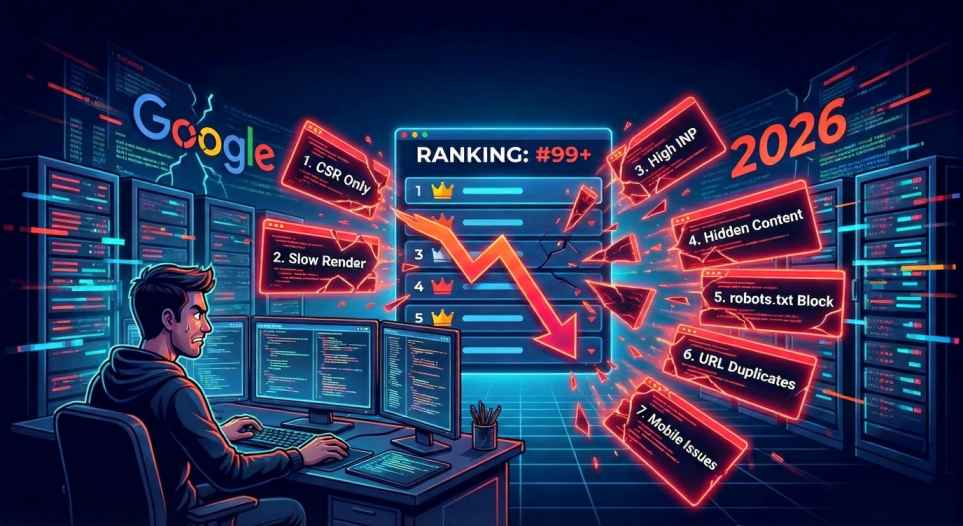
I’ve spent years under the hood of these frameworks, and I’ve noticed a pattern. There are exactly 7 JavaScript SEO mistakes that keep happening. These aren’t just minor “optimization” tweaks but they are fundamental flaws that act like a noindex tag you never meant to add.
We’re going to walk through these pitfalls. I’ll show you why they’re killing your rankings and more importantly it give you the exact code-level fixes to stop the bleeding. Whether you’re a developer who wants their work to be seen or a founder wondering why your expensive new site is a ghost town, this is for you.
Let’s stop making things hard for Google and start making it impossible for them to ignore you.
Mistake 1: Over-Reliance on Client-Side Rendering (CSR)
Why Pure CSR is a Ranking Killer in 2026
Building a Single Page Application (SPA) with vanilla React or Vue feels great. It’s snappy, the transitions are smooth, and the developer experience is top-tier. But if you’re relying on Client-Side Rendering (CSR) for a site that needs to pay the bills through organic traffic? You’re basically playing SEO on “Hard Mode.”
In 2026, the “Rendering Gap” is the silent killer of rankings. While Googlebot has gotten significantly better at executing JavaScript, it still operates on a rendering budget. Think of it like a credit card:
Google has a finite amount of “computational cash” to spend on your site. If it has to download a 2MB JS bundle, parse it, and execute it just to find out what your H1 tag says, it might just give up and move on to a competitor who serves plain HTML.
The Cost of Invisibility: AI and Indexing Delays
AI search engines (like Perplexity, ChatGPT, and even Google’s own AI Overviews) are even more impatient than traditional crawlers. Many of these LLM-based bots don’t even bother rendering JavaScript.
They scrape the raw HTML. If your site is a pure CSR app, these bots see a div id="root" and absolutely nothing else. You aren’t just losing a spot on page one; you’re being excluded from the entire AI-driven discovery ecosystem.
And for Google? Even if they do render your page, it happens in a “second wave.”
- Wave 1: Google crawls the raw HTML (which is empty in CSR).
- Wave 2: Days or weeks later, when resources allow, it renders the JS and indexes the content.
Can your business afford to wait ten days for Google to see a price change or a new blog post? Probably not.
The Fix: Moving Toward SSR and SSG
If you’re still using a “Create React App” style setup, it’s time to level up. At Zumeirah, we almost exclusively push for Server-Side Rendering (SSR) or Static Site Generation (SSG).
The solution isn’t to ditch JavaScript actually it’s to change where it runs.
- Next.js: This is the gold standard. It allows you to pre-render pages on the server. When Googlebot hits a Next.js site, it gets a fully-formed HTML document immediately.
- Gatsby: Perfect for content-heavy sites that don’t change every minute. It builds your entire site into static files at deploy time.
- Remix: Another powerful alternative that focuses on the “Web Standards” approach, making sure your site works even if the JS fails to load.
How to Audit Your Own Site (The 5-Second Test)
You don’t need expensive tools to see if you have this problem. Open your website in Chrome, right-click, and select “View Page Source.”
The Litmus Test: If you see your actual content (text, headlines, links) in the source code, you’re in good shape. If you see a wall of
<script>tags and an empty<body>, you have a CSR problem.
Pro Tip: Use the URL Inspection Tool in Google Search Console. Click “Test Live URL” and then “View Tested Page.” Check the “Screenshot” and the “More Info” tab. If the screenshot is blank or the HTML code is missing your keywords, Googlebot is struggling.
Honestly, in 2026, speed and “crawl-ability” are the same thing. If you make Google work too hard to read your content, they’ll just find someone else who makes it easy.
Mistake 2: Ignoring JavaScript Rendering Delays and Errors
How JS Errors and Delays Sabotage Your Visibility
You know what’s worse than Google not seeing your site at all? Google seeing a half-baked, broken version of it because your scripts took too long to wake up.
In 2026, Googlebot is smarter, but it’s also on a strict schedule. It’s like a high-speed train and it stops at your station, but if you aren’t ready to board within a few seconds, it’s pulling away.
This is where rendering timeouts become a silent killer for your rankings. Currently, Google’s “patience window” for rendering a page is roughly 5 seconds. If your fancy 3D gallery or AI-driven product recommendation engine takes 6 seconds to fetch data and render, Googlebot has already checked out and moved on to the next site.
The result? Incomplete content crawling. You might have the best content in the world, but if it’s trapped behind an unhandled promise or a slow API call, it’s invisible.
The “Silent Failures” of Modern Frameworks
Sometimes your site looks perfect to you on your $3,000 MacBook with a fiber connection. But Googlebot doesn’t browse like you do. It mimics a mid-range mobile device on a throttled connection.
- Syntax Errors: A single missing semicolon or a fancy new ES2026 feature that isn’t transpiled correctly can crash the entire rendering process for a bot.
- Unhandled Promises: If your code says “Wait for this data,” but the data never arrives (or arrives too late), the bot sees a blank screen or a loading spinner.
- Resource-Intensive Scripts: Large bundles (we’re talking those 500kb+ monsters) block the main thread. While the bot is busy trying to “parse” your massive JS file, its timer is ticking down.
It’s heartbreaking to see a great brand lose traffic just because a third-party tracking script decided to hang for three seconds during a crawl.
The Fix: Monitoring and Resilience
You can’t just “set it and forget it” with JavaScript. You need to know when things break in the wild.
- Implement Real-Time Monitoring: Tools like Sentry or LogRocket are non-negotiable now. They don’t just tell you a script crashed; they show you why it crashed for a specific “user” and including when that user is a search crawler.
- Minify and Split: Stop sending the whole kitchen sink in one
main.jsfile. Use Code Splitting to ensure the bot only gets the JavaScript it actually needs to see the content on the current page. - Progressive Enhancement: This is old-school, but it’s making a massive comeback. Build the “must-have” content in basic HTML, then “enhance” it with JavaScript. If the JS fails or times out, the user (and the bot) still gets the core message.
SEO Tips: Checking Under the Hood
Don’t guess. Use the URL Inspection Tool in Google Search Console like a daily ritual.
Pro Tip: When you use “Test Live URL,” don’t just look at the screenshot. Click on the “View Tested Page” tab and look at the “More Info” section. Check the Page Resources. If you see a list of “Red” items saying “Timed Out” or “Other Error,” you’ve found your ranking leak.
At the end of the day, Google wants to rank sites that are reliable. If your JavaScript is a “maybe,” your ranking will be a “no.” Let’s make sure your code is as robust as your content.
Mistake 3: Failing to Optimize for Core Web Vitals in JS-Heavy Sites
JS Bloat Destroying Your Page Experience Scores
If you aren’t obsessing over your Core Web Vitals in 2026, you’re basically handing your rankings to your competitors on a silver platter. We’ve moved past the point where “fast” is a subjective feeling.
For Google, speed is now a quantified set of metrics that determine whether your site is a premium experience or a digital junk drawer.
When you’re building with heavy JavaScript whether it’s a massive React dashboard or a flashy three-js landing page, your biggest enemy is bloat. Every kilobyte of unused code is a tax on your user’s browser. And you know what? Google is the tax collector.
The 2026 Power Trio: LCP, INP, and CLS
If your JavaScript is out of control, it’s going to sabotage the three pillars of Page Experience:
- Largest Contentful Paint (LCP): This is the “loading” part. If your main hero image or headline has to wait for a 400kb JavaScript bundle to download and execute before it can appear, your LCP is going to tank. In 2026, if your LCP is over 2.5 seconds, you’re officially in the “needs improvement” danger zone.
- Interaction to Next Paint (INP): This is the big one for 2026. INP replaced FID (First Input Delay) a while back, and it’s much stricter. It doesn’t just care about the first click; it cares about every click. If your JS is hogging the main thread with long tasks, your users will feel a lag when they try to open a menu or filter a product list. Anything over 200ms is a red flag.
- Cumulative Layout Shift (CLS): We’ve all been there and you go to click a link, and suddenly the whole page jumps because an ad or a dynamic component finished loading. That “jump” is CLS. JS-heavy sites often inject content dynamically, and if you don’t reserve space for it, your layout will shift like a house of cards in a breeze.
The Impact: Direct Ranking Penalties
This isn’t just about “user happiness.” Since the 2024 core updates, failing these metrics provides a direct downward pressure on your rankings. I’ve seen sites with world-class content get outranked by “thinner” sites simply because the thinner sites loaded instantly and didn’t make the user’s phone feel like it was about to explode.
The Fix: Trim the Fat and Prioritize
You don’t have to delete your features; you just have to be smarter about how you serve them.
- Defer Non-Critical JS: If a script isn’t needed for the “Above the Fold” experience (like that chatbot in the footer or the tracking pixel), use the
deferorasyncattribute. Stop letting the footer kill the header’s performance. - Code Splitting: Instead of one giant
bundle.js, break it into smaller chunks. Load only what is needed for the specific page the user is on. - Yield to the Main Thread: Break up those “Long Tasks” (anything over 50ms). Use
setTimeout()or the modernrequestIdleCallback()to give the browser a chance to breathe and handle user inputs between your heavy logic. - Leverage CDNs: Use a Content Delivery Network like Cloudflare or Vercel Edge to get your JS files physically closer to your users. Distance is delay.
SEO Tip: Benchmarking for 2026
Forget the “pass/fail” from two years ago. In 2026, the standard is higher.
The New Benchmark: Aim for a “Good” status on at least 75% of your real-world page loads. Use PageSpeed Insights but look specifically at the Field Data (the “Chrome User Experience Report” section). Lab data is a simulation; field data is what Google actually uses to rank you.
Honestly, most developers spend too much time on the “pretty” and not enough on the “performant.” But in 2026, if it isn’t performant, nobody is ever going to see the pretty part anyway.
Mistake 4: Poor Handling of Dynamic Content and Lazy Loading
Hidden Content That’s Invisible to Crawlers
There is nothing more frustrating than writing a 2,000-word masterpiece, only to realize Google thinks your page is just a header and a footer. This is the “Ghost Content” trap.
In 2026, we’ve reached a point where almost every modern site uses some form of dynamic injection or lazy loading to keep things fast. But if you aren’t careful, you’re essentially playing hide-and-seek with a blindfolded crawler.
The logic seems sound: “Why load the whole article if the user hasn’t scrolled down yet?” It saves bandwidth and boosts your initial speed scores.
But here’s the kicker like Googlebot doesn’t scroll. It doesn’t have a thumb. It doesn’t have a mouse wheel. If your content only “wakes up” because of a scroll event listener, it basically doesn’t exist to the index.
The Infinite Scroll and “Load More” Disaster
I see this all the time with e-commerce category pages and news feeds. You implement an infinite scroll because it “feels like Instagram.” But if that scroll doesn’t update the URL or have a paginated fallback, Google will only ever index the first 10 items.
In 2026’s hyper-competitive landscape, losing those “deep” pages means you’re losing long-tail traffic. If your “Best Running Shoes” list has 100 items but Google only sees 10, you’re missing out on 90% of your potential search visibility. It’s like owning a library but only letting people see the front desk.
The Fix: Intersection Observer and Hybrid Pagination
You don’t have to give up your smooth UX, but you do have to be smarter than a basic onScroll event.
- Use the Intersection Observer API: This is the modern standard. Unlike the old-school scroll listeners that hog the main thread (killing your INP), the Intersection Observer is native and efficient. Most importantly, Googlebot is now optimized to trigger these observers when it “virtually” expands the viewport.
- The “Load More” Fallback: If you use a “Load More” button, make sure it’s a real
<a href>link that points to a paginated version of the page (e.g.,/blog/page/2). This gives the bot a clear path to follow even if it doesn’t “click” the button. - Pre-render Critical Content: Anything that is vital to your SEO means your H1, your first two paragraphs, your primary product details should never be lazy-loaded. It should be in the initial HTML response.
SEO Tips: The “No-JS” Litmus Test
You want to know what Google really sees? You can do it right now in your browser.
- Open your site in Chrome.
- Open DevTools (
F12). - Hit
Ctrl+Shift+P(orCmd+Shift+Pon Mac). - Type “Disable JavaScript” and hit enter.
- Refresh the page.
The Brutal Truth: Whatever is gone from the screen when JS is off is content that Google might struggle to index. If your main content disappears, you have a problem.
At Zumeirah, we also recommend adding Structured Data (Schema.org) for dynamic elements. Even if the visual content is loaded via JS, having your JSON-LD schema in the head of the document ensures that AI search engines and Google know exactly what is on the page before a single script even runs.
Honestly, lazy loading should be a performance tool, not an SEO barrier. If you’re making Google work to find your content, they’ll just go find someone who makes it easy.
Mistake 5: Blocking JavaScript Resources from Search Engine Crawlers
Robots.txt Pitfalls That Block Your JS Files
Sometimes we are our own worst enemies. I’ve seen this happen a dozen times: a developer or a “security-first” IT manager decides to tighten up the site’s security and accidentally nukes their entire SEO strategy with two lines of text in a file no bigger than a tweet. I’m talking about the robots.txt file.
Back in the day and by that, I mean way back, people used to think it was “cleaner” to hide their /scripts/ or /js/ folders from crawlers. The logic was, “Why should Google waste time looking at my code? They only need to see the content.”
But that was before Google turned into a fully-fledged browser. In 2026, Googlebot doesn’t just read your text; it renders your experience. If you block the JavaScript files that build your page, you’re basically asking Google to judge a painting while it’s still covered by a tarp.
The 2026 AI Bot Factor
Here’s the thing that’s changed recently, It’s not just about Google anymore. We now have a whole ecosystem of AI-driven search agents like think GPTBot, ClaudeBot, and specialized search crawlers like OAI-SearchBot. These bots are looking for structured data and dynamic content to feed into their real-time answers.
If your robots.txt has an accidental Disallow: /assets/js/, these bots won’t just see a “broken” page, they might see an empty one.
And since these AI models are increasingly responsible for driving “zero-click” traffic, being blocked means you aren’t just losing a rank on a list; you’re being left out of the conversation entirely.
It’s like being the only person not invited to a neighborhood dinner party because you forgot to unlock your front gate.
The Fix: Audit, Allow, and Verify
Let me explain how to fix this without making your site a playground for every rogue scraper on the internet.
- The “Allow” Rule: If you must block certain administrative scripts, make sure you specifically allow the ones that matter for rendering. A simple
Allow: /assets/js/main.jscan save your life if you’ve blocked the parent folder. - The Search Console Sanity Check: This is my favorite “secret” at Zumeirah. Go into Google Search Console and use the URL Inspection Tool. When you test a live URL, look at the “Page Resources” list. If you see any JS files listed as “Blocked by robots.txt,” you have a ranking leak. Fix it immediately.
- Segment Your Bots: In 2026, you can (and should) treat AI bots differently. You might want to allow OAI-SearchBot to see everything so you show up in ChatGPT’s search results, but maybe you want to block other more aggressive training bots that just suck up your bandwidth without giving you any traffic.
SEO Tips: Using the Right Tools
You know what? Most people forget that robots.txt is case-sensitive. If your folder is /JS/ and your rule is Disallow: /js/, you haven’t actually blocked anything. It’s a tiny detail, but it’s the kind of thing that makes you want to pull your hair out when you’re troubleshooting why your React components aren’t being indexed.
One last thing: If you’re using an X-Robots-Tag in your HTTP headers to block things, be extremely careful. Unlike a visible
robots.txtfile, these headers are “silent” and can be a nightmare to find during a technical audit.
At the end of the day, Google wants to see your site exactly the same way a human does. If a human needs that JavaScript to see your pricing table or your blog post, then Google needs it too. Don’t build a wall between your content and the bot that’s supposed to rank it.
Mistake 6: Neglecting Canonicalization and URL Structures in SPAs
Duplicate Content and URL Mess in Single-Page Apps
Let’s talk about a mistake that is honestly embarrassing for how often it still happens in 2026: messy URL structures in Single-Page Applications (SPAs).
If you’re still using hash-based URLs (like zumeirah.com/#/services), you are essentially telling Google, “Please ignore 90% of my website.” In the eyes of a search engine, anything after a # is a fragment, not a unique page.
It doesn’t matter how much gold is buried in that fragment like Googlebot generally won’t index it as a separate URL.
The result? You have ten “pages” of content, but in search results, they all collapse into a single, confusing homepage result. This dilutes your link equity and leaves users clicking on a search result that might not even lead them to the right section of your app.
The 2026 Canonical Trap: The “Double Check”
Here’s the thing about JavaScript SEO in 2026 that even seasoned pros forget: Google evaluates your canonical tags twice.
- The Raw HTML Phase: When Google first crawls your site, it looks at the static code sent from your server.
- The Rendered Phase: After the JavaScript executes, Google looks again.
If your raw HTML says the canonical is zumeirah.com/page-a but your React or Next.js code dynamically changes it to zumeirah.com/page-b after the page loads, you are sending conflicting signals.
Google hates mixed signals. Usually, when it sees a mismatch, it will simply ignore both and choose whatever URL it thinks is best. Trust me, you don’t want to leave that decision up to an algorithm.
The Fix: Clean URLs and Consistent Tags
You need to ensure your SPA feels like a “real” website to a crawler.
- Implement HTML5 pushState: Stop using hashes. Use the History API to ensure every “view” in your app has a clean, unique URL (e.g.,
zumeirah.com/services/web-design). This makes your site crawlable and your content shareable. - Self-Referential Canonicals: Every unique page should have a canonical tag in the
<head>that points to itself. This prevents “URL parameter sprawl” (like?utm_source=...) from creating thousands of duplicate content issues. - Server-Side Metadata: Don’t wait for JavaScript to inject your canonical tag. If you’re using Next.js, use the
MetadataAPI to ensure your canonicals are baked into the raw HTML before it even hits the browser.
SEO Tip: The GSC “Duplicate” Warning
Keep a close eye on your Google Search Console “Pages” report. Look specifically for the status: “Duplicate, Google chose different canonical than user.” > The Fix: If you see this, use the URL Inspection tool to compare the “Crawl” vs. the “Rendered” HTML. If they don’t match, your JavaScript is likely overriding your server-side settings.
Honestly, it’s a simple fix, but it’s the difference between having your site structure recognized as an authority or just being seen as one big, confusing pile of code.
Mistake 7: Overlooking Mobile Optimization in JavaScript Frameworks
Mobile-First Failures in a JS-Dominated World
If you’re still designing for desktop first and “fixing” it for mobile later, you’re living in 2015. In 2026, Google’s mobile-first indexing is no longer a “priority” and it is the absolute law of the land.
If your JavaScript framework isn’t optimized for a mid-range Android phone on a spotty 4G connection, you aren’t just losing mobile rankings; your entire site’s authority is being dragged down.
I’ve seen developers build these incredible, high-fidelity React interfaces that look stunning on a 27-inch 5K monitor. But the second you open them on a mobile device, the “JavaScript Tax” kicks in. The processor heats up, the battery drains, and the user is left staring at a blank screen while the browser tries to parse a 2MB bundle.
In 2026, Googlebot Mobile is the only bot that matters for your primary indexation. If that bot encounters a “viewport mismatch” or a script that crashes its mobile rendering engine, your site is effectively dead in the water.
The “Touch Event” Trap and Viewport Gaps
One of the most common issues we see involves how JavaScript handles user interaction on mobile.
- The Touch Delay: If your JS is using
clicklisteners instead of optimizedtouchstartor passive event listeners, you’re introducing a 300ms lag. That might not sound like much, but for Interaction to Next Paint (INP), it’s the difference between a “Good” and “Poor” score. - Viewport Mismatches: Sometimes, your JavaScript might dynamically calculate element sizes based on the window width. If that script runs after Googlebot has already measured the layout, you end up with “Content wider than screen” errors in Search Console.
- The “Invisible” Hamburger: If your mobile menu is purely JS-driven and doesn’t have a semantic HTML fallback, Googlebot might never “see” the links inside it. That means your internal pages aren’t getting the link equity they deserve.
The Fix: Adopt a “Mobile-Native” Web Mindset
You don’t need a separate mobile site (please, no more m.website.com), but you do need to prioritize mobile execution.
- Prioritize Mobile Core Web Vitals: Stop looking at your Desktop Lighthouse scores. They are a vanity metric. If your mobile LCP is over 2.5 seconds, that’s your only priority.
- Test on Real-World Emulators: Use Chrome DevTools to throttle your CPU to “6x slowdown” and your network to “Fast 4G.” If your site feels sluggish there, it’s failing Google’s mobile-first criteria.
- PWA Features over AMP: In 2026, AMP is largely a relic. Instead, focus on Progressive Web App (PWA) features. Service workers can cache your JavaScript locally on the user’s phone, making subsequent loads near-instant even if they’re in a Dubai elevator with one bar of signal.
- Touch Target Size: Ensure your buttons are at least 48×48 pixels. Google’s AI agents check for “Tap Target” spacing. If your JS-rendered buttons are too close together, you’ll get hit with a usability penalty.
SEO Tips: The Search Console “Mobile Usability” Audit
Don’t wait for your traffic to drop to realize you have a problem.
Pro Tip: Go to Google Search Console and check the “Mobile Usability” report under the Experience tab. If you see errors like “Clickable elements too close together” or “Text too small to read,” those are almost always caused by JavaScript failing to load the correct CSS or layout logic in time for the crawler.
At the end of the day, Google wants to provide a great experience for the person searching on their phone while waiting for a taxi. If your JavaScript makes that experience frustrating, you’re going to be outranked by someone who kept it simple, fast, and mobile-friendly.
Conclusion: Blueprint for JavaScript SEO in 2026
We’ve covered a lot of ground like from the “No-Index Catch-22” to the hidden traps of mobile optimization. But if I can leave you with one final thought, it’s this: JavaScript is a tool, not a crutch.
In 2026, the websites that rank #1 aren’t the ones with the most complex code; they are the ones that use code to enhance a rock-solid, accessible HTML foundation.
You know what? Honestly, the “secret” to JavaScript SEO isn’t actually about the JavaScript at all. It’s about ensuring that search engines and AI agents don’t need your JavaScript to understand who you are, what you do, and why you’re the best at it.
Your 2026 JS SEO Checklist:
- [ ] Verify Rendering: Does “View Page Source” show your content?
- [ ] Check the Headers: Is your metadata identical in the raw HTML and the rendered DOM?
- [ ] Monitor INP: Are your scripts blocking user interactions for more than 200ms?
- [ ] Audit Robots.txt: Are you accidentally blocking the scripts Google needs to see your layout?
- [ ] Mobile First: Does your site pass the 6x CPU slowdown test?
If you can tick these boxes, you’re already ahead of 90% of your competition and including the “big blogs” that are still giving out advice from 2022.
At Zumeirah, we believe that the best websites are built at the intersection of high-end design and technical perfection. Don’t let a few lines of unoptimized code stand between you and the first page of Google.
The Big Picture: Future-Proofing Your Code for 2026 and Beyond
If you’ve made it this far, you’re already miles ahead of the competition. We’ve dissected everything from the “No-Index Catch-22” and the rendering budget to the subtle ways that unoptimized mobile touch events can tank your authority.
But here’s the thing: JavaScript SEO in 2026 isn’t a “set it and forget it” task. It’s a living, breathing part of your development lifecycle.
Let me explain. We aren’t just building for Google anymore. We are building for a hybrid world where traditional search, AI-driven answer engines, and voice-activated assistants all need to consume your data.
If your site relies on a brittle, JS-heavy structure, you’re essentially speaking a language that half the world’s “listeners” can’t understand.
The 7 Mistakes: A Quick Recap
If you’re skimming (we all do it), here is the “too long; didn’t read” version of what’s killing your rankings:
- Over-Reliance on CSR: Stop sending empty HTML shells. Use SSR or SSG.
- Ignoring Rendering Errors: If the bot times out or hits a syntax error, your content is a ghost.
- Failing Core Web Vitals: JS bloat kills your INP and LCP. Trim the fat.
- Poor Dynamic Handling: If it only appears on scroll, Googlebot might never see it.
- Blocking JS Resources: Don’t lock the door (robots.txt) and then wonder why the guest (Googlebot) didn’t come in.
- Neglecting Canonicalization: Ensure your URLs are clean and your tags are consistent across raw and rendered states.
- Overlooking Mobile-First: If it doesn’t work on a mid-range phone with spotty signal, it doesn’t work at all.
What’s Next? The Horizon of AI-Optimized JS
The next frontier is already here. We are starting to see the rise of “AI-ready” JavaScript frameworks that automatically prioritize the most important data for LLM scrapers. We’re moving toward a web where Generative Engine Optimization (GEO) will be just as important as traditional SEO.
We’re also seeing a massive shift toward voice and sensory search. If your JavaScript is used to hide content in complex accordions or “read more” buttons without proper ARIA labels and semantic links, you’re going to lose out on the growing percentage of users who search without a screen.
Time to Audit: Your Move
Knowledge without action is just trivia. I want you to go to your site right now and perform the “No-JS” test we discussed. If your core message disappears, it’s time to roll up your sleeves.
At Zumeirah, we’ve seen that small, technical pivots can lead to massive ranking gains. Whether you’re considering switching to the Best JS Frameworks for SEO or you just need to refactor a few problematic scripts, the best time to start was yesterday. The second best time is right now.
Monitor your Search Console, keep an eye on your “Rendered” vs. “Raw” HTML, and never stop testing. The search landscape of 2026 is competitive, but for those who master the technical nuances of JavaScript, the opportunities are honestly limitless.
FAQs: JavaScript SEO in 2026
Question 1: What is the biggest change in JavaScript SEO for 2026?
The biggest shift is the move toward AI-Readiness. While Googlebot is getting better at rendering, the rise of AI search agents like Gemini and Perplexity has changed the game. These bots often prioritize “raw” content over rendered content to save resources.
If your JavaScript hides your main message, you might rank on Google but remain invisible to the AI Overviews that now dominate the top of the SERPs. Plus, Interaction to Next Paint (INP) has officially become the make-or-break metric for JS-heavy sites.
Question 2: How can I test if Google is rendering my JS correctly?
The most reliable way is still the URL Inspection Tool in Google Search Console. Use the “Test Live URL” feature and click on “View Tested Page.” You need to look at the HTML tab, not just the screenshot.
If your text isn’t in that HTML code, Google isn’t “seeing” it. You know what? A quick “human” test is to simply disable JavaScript in your own browser; if your site turns into a blank screen, you’ve got work to do.
Question 3: Is SSR always better than CSR for SEO?
In 2026, the answer is a resounding yes for any content you want to rank. While Client-Side Rendering (CSR) is great for gated dashboards or apps, it’s a massive risk for public-facing pages.
Server-Side Rendering (SSR) or Static Site Generation (SSG) ensures that every crawler whether it’s an old-school bot or a brand-new AI agent can gets your full content instantly without waiting for a “second wave” of indexing.
Question 4: What tools should I use for JS SEO audits?
I always recommend a “power trio.” Start with Google Search Console for the official word on how you’re being indexed. Then, use Screaming Frog with the “JavaScript Rendering” mode enabled to crawl your site at scale. Finally, use PageSpeed Insights to monitor your real-world user data (CrUX).
If you’re managing a massive enterprise site, tools like Sitebulb or Lumar are excellent for catching those tricky “Response vs. Render” discrepancies.
Question 5: How does AI impact JavaScript SEO in 2026?
AI has made “clean code” more important than ever. Search engines now use AI models to decide which pages are worth the “rendering budget.”
If your JavaScript is messy, bloated, or hides your core “entities” (like product names or prices), the AI will simply classify your page as low-value and skip it. Honestly, it’s about making your data as easy as possible for a machine to digest.