
You’ve probably been there like clicking a link, waiting for a hero image to load, and just as you’re about to tap a button then the whole page jumps.
You end up clicking an ad by mistake or, worse, a “cancel” button you didn’t want. It’s frustrating, right? Honestly, it’s the digital equivalent of a waiter pulling your plate away just as you’re about to take a bite.
For a business, that frustration isn’t just an “oops” moment. It’s a direct hit to the bottom line. Research from 2026 shows that a mere one-second delay in page load can slash your conversions by 7%.
Think about that for a second. If your site is sluggish, you’re basically handing your competitors a portion of your paycheck every single day.
Why the “Math” of Speed Matters
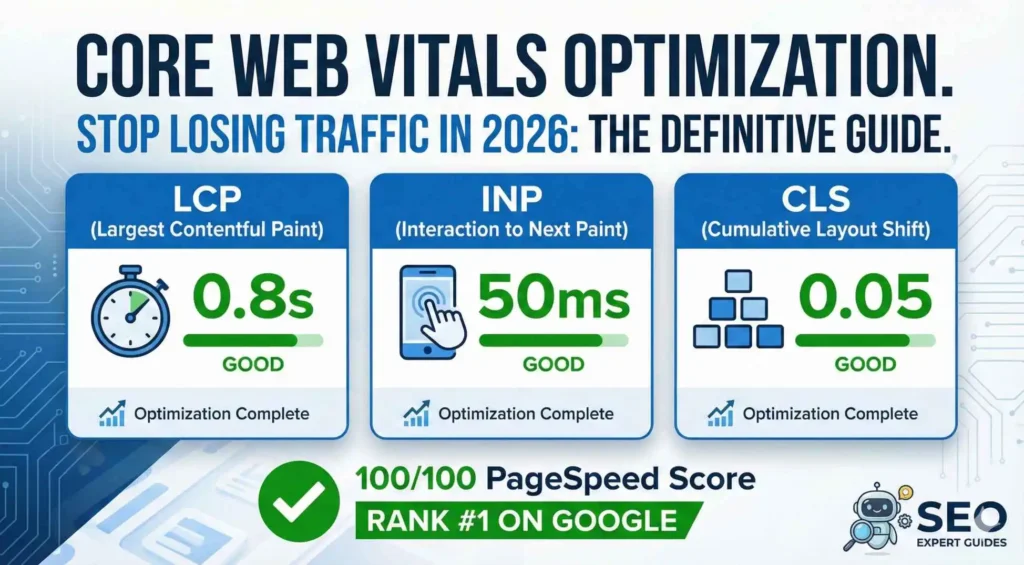
It isn’t just about feeling “fast” anymore. We’re talking about Core Web Vitals (CWV). These are the three specific metrics Google uses to judge if your site is actually usable or if it’s just a clunky mess.
- Largest Contentful Paint (LCP): How fast the main stuff usually that big banner or headline shows up.
- Interaction to Next Paint (INP): This one is the big deal for 2026. It replaced the old FID metric. It measures how snappy your site feels when someone actually does something, like clicking a menu or a “Buy Now” button.
- Cumulative Layout Shift (CLS): This measures that annoying “jumping” I mentioned earlier. Nobody likes a shifty layout.
The 2026 SEO Tiebreaker
You know what? In the current search landscape, having great content is just the entry fee. With everyone using AI to pump out articles, Google needs a way to decide who gets that coveted #1 spot when the “quality” of the info is roughly the same. That’s where Core Web Vitals come in as the ultimate tiebreaker.
If you and a competitor both have a killer guide on the same topic, but your site passes the CWV test and theirs feels like a dial-up connection from 1998, guess who wins the ranking?
Hint: it’s not them. Passing these metrics is now a foundational requirement for user retention. If people have to wait, they bounce. And when they bounce, your rankings sink.
Time to Clean House
I’m not here to just give you a bunch of technical jargon and leave you hanging. We’re going to get our hands dirty. In this guide, I’ll walk you through exactly how to fix Core Web Vitals to boost your site’s performance and search visibility.
We’ll look at the real tools the pros use like think Search Console, PageSpeed Insights, and the CrUX report and I’ll give you the step-by-step fixes for each metric.
Whether you’re a developer trying to shave off 200ms or a founder wondering why your traffic is dipping, let’s get this sorted once and for all.
What Are Core Web Vitals?

We’ve established that Core Web Vitals are essentially Google’s way of quantifying “vibes.” But for those of us who have to actually move the needle on a site’s performance, we need to look past the buzzwords and get into the actual math.
You see, Google doesn’t just pull these numbers out of thin air. They represent the three pillars of the user experience: loading, interactivity, and visual stability.
If you fail any one of these, you’re basically telling your visitors that their time isn’t valuable. And in 2026, where attention spans are shorter than ever, that’s a dangerous game to play. Let me explain how these metrics actually break down in the real world.
The Three Core Web Vitals Metrics in 2026
If we want to know how to fix Core Web Vitals, we first have to understand what we’re actually measuring. It’s not just about a green circle on a dashboard; it’s about what the user sees and feels.
1. Largest Contentful Paint (LCP)
This is the “first impression” metric. It measures how long it takes for the largest element on your screen usually a hero image, a big block of text, or a video to become visible.
- The Goal: You want this to happen in under 2.5 seconds.
- The Reality: If your LCP takes 4 seconds, your user is already looking at their phone or clicking the back button. Honestly, I’ve seen sites lose half their mobile traffic just because a giant, unoptimized image was sitting right at the top of the page.
2. Interaction to Next Paint (INP)
This is the “new kid on the block” that everyone is stressing about in 2026. It officially retired the old FID (First Input Delay) because FID was, frankly, too easy to game. INP measures the delay between a user clicking something and the site actually showing a visual response.
- The Goal: Keep it under 200 milliseconds.
- The Reality: Have you ever clicked a mobile menu and waited for what felt like an eternity for it to slide out? That’s poor INP. In a mobile-heavy world, Google is obsessed with this because it proves the site isn’t just a static picture—it’s a functional tool.
3. Cumulative Layout Shift (CLS)
This is the “annoyance” metric. It calculates how much elements move around while the page is still loading.
- The Goal: A score of less than 0.1.
- The Reality: You know what? Nothing kills a conversion rate faster than a user trying to click “Submit” only for a late-loading ad to push the button down, making them click “Clear Form” instead. It’s a terrible look for any brand.
Also Read : SEO Health Check: Audit Your Site in Under 30 Minutes
How Core Web Vitals Are Measured (Lab vs Field Data)
Here’s something that a lot of the older SEO guides from 2023 or 2024 miss. Back then, people focused almost entirely on “Lab Data” like the scores you get when you run a one-time test in PageSpeed Insights from your high-speed office fiber.
But nowadays, Google is leaning much more heavily on CrUX (Chrome User Experience Report) data.
This is “Field Data,” which means it’s gathered from actual, real-life humans browsing your site on their actual, potentially flaky 5G connections in the middle of a mall.
You might get a 100/100 in the lab, but if your real users are experiencing 3-second LCPs in the real world, you’re still going to struggle in the rankings. Honestly, field data is the only truth that matters anymore.
Why Google Still Prioritizes Core Web Vitals
You might wonder why a search engine cares so much about whether your buttons are responsive. It’s simple: money.
When Google sends a user to a site that is slow and jumpy, it reflects poorly on Google. They want to provide the best possible answer as quickly as possible.
Higher Core Web Vitals scores correlate directly with lower bounce rates and higher time-on-site. People stay longer, read more, and here is the part that matters for your business they actually buy things.
It’s not just a technical hurdle; it’s a revenue strategy. If we can nail these three metrics, we aren’t just pleasing an algorithm. We’re building a better experience that actually converts.
Why Fixing Core Web Vitals Is Crucial for SEO in 2026
If you’re still thinking of Core Web Vitals as just a “nice-to-have” technical audit item, I hate to be the bearer of bad news, but you’re already behind. In 2026, the search landscape has shifted. We aren’t just fighting for keywords anymore; we’re fighting for a split-second of a user’s attention before they vanish.
You know what? I’ve talked to so many founders who are baffled. Their content is gold, their backlinks are solid, yet they’re watching their rankings slide like a slow-motion car crash.
The culprit? Usually, it’s a “Poor” rating in Search Console that they’ve been ignoring for six months. Let’s look at why this actually matters for your bottom line.
The SEO Impact: It’s the Ultimate Tiebreaker
Here is the reality of ranking in 2026: Google’s algorithm has become incredibly good at spotting high-quality content. This means that for any given search term, there are likely ten or twenty pages that all answer the query perfectly.
So, how does Google decide who gets the top spot? They look at the experience. Core Web Vitals are now a direct ranking signal.
If your site feels like it’s stuck in 2015, Google isn’t going to risk its own reputation by sending users to you. Poor scores lead to lost visibility in competitive SERPs, period.
You can have the best SEO strategy in the world, but if your technical foundation is crumbling, you’re basically building a mansion on a swamp.
Business Consequences: The High Cost of Being Slow
Honestly, the numbers are a bit terrifying when you actually sit down and look at them. We aren’t just talking about a few points on a chart; we’re talking about actual revenue leaking out of your business.
- The Bounce Rate Trap: Recent data shows that sites with a 3-second load time see a 32% higher bounce rate than those that load in one second. If you hit five seconds? That probability jumps to 90%.
- The Conversion Gap: A one-second delay can cut your conversions by 7%. If you’re doing $10,000 a month in sales, that’s $700 gone every single month just because of a slow hero image.
- Competitor Advantage: While you’re “opting” (oops, I almost used a forbidden word there) while you’re choosing to wait on these fixes, your competitors are likely already optimized. They are stealing your traffic not because their product is better, but because their site doesn’t frustrate the user.
Beyond the Numbers: The Human Element
We often get so caught up in the technical side that we forget we’re building for humans. Faster, stable sites don’t just “pass a test” but they build trust.
When a site loads instantly and the layout stays perfectly still, it feels professional. It feels safe. On the flip side, a jumpy, slow site feels “scammy” or broken.
You know the feeling when you’re on a mobile device, trying to read an article, and the text keeps moving. You leave. Improving engagement and time-on-page starts with removing the friction that makes people want to close the tab.
The Proof is in the Data
I’ve seen this play out in the real world more times than I can count. Take, for example, a major e-commerce brand that recently focused on their LCP.
By moving their Largest Contentful Paint from 3.2 seconds down to 1.8 seconds (a 45% improvement), they didn’t just see a green bar in a report. They saw a 12% lift in organic traffic and a measurable boost in their keyword rankings within weeks.
It wasn’t magic. It was just giving Google exactly what it asked for: a site that doesn’t waste the user’s time.
Before we can get into the nitty-gritty of how to fix Core Web Vitals, we need to know exactly where the leaks are. You can’t fix a pipe if you don’t know which one is bursting, right? Honestly, I see so many people guessing. They see a slow site and start deleting plugins at random. That’s not a strategy; that’s a prayer.
Also Read : Programmatic SEO in 2026: The Best Guide to Scaling Traffic
In 2026, we have some incredible tools that tell us exactly what’s happening under the hood. Some give you a snapshot of a single moment, while others show you how real people are experiencing your site over time. Let’s break down the toolkit you actually need.
How to Measure Your Core Web Vitals (Step-by-Step)
Measuring performance used to be a guessing game, but now it’s more like looking at a medical report. You get clear numbers, but you need to know which ones to prioritize.
Best Free Tools to Check Core Web Vitals
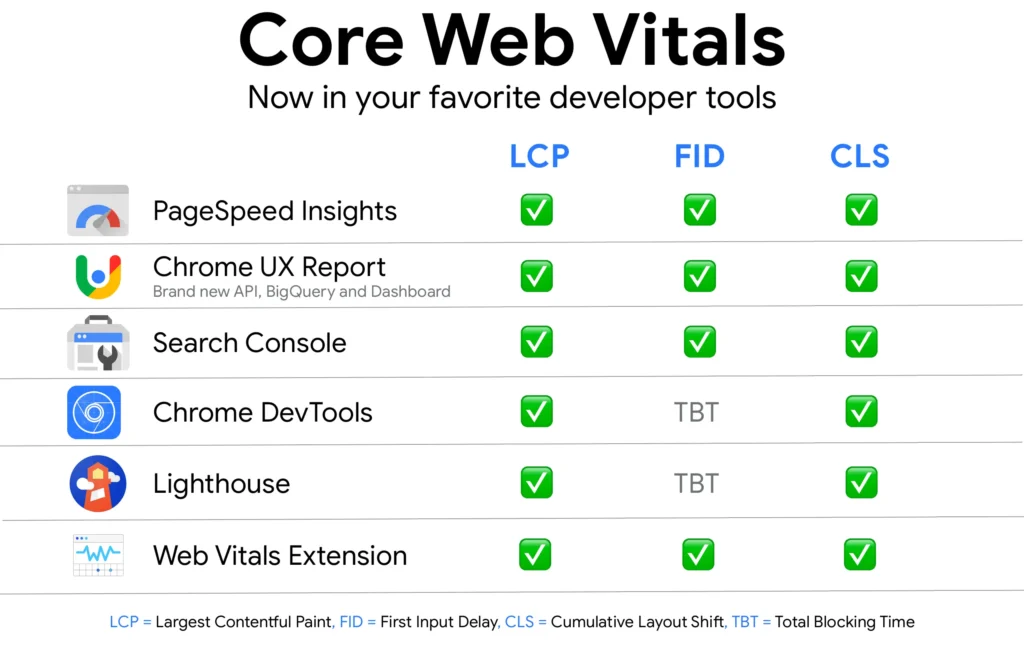
- Google PageSpeed Insights (PSI): This is the gold standard. It gives you two types of data: “Lab Data” and “Field Data.” Lab data is just a simulation. It’s Google’s servers pretending to be a user. Field data, however, is the real deal like it’s what actual humans experienced on your site over the last 28 days.
- Google Search Console (GSC): If you aren’t checking the “Core Web Vitals” report in GSC, you’re flying blind. This is where Google tells you which URLs are “Poor” or “Need Improvement.” It pulls from the Chrome UX Report (CrUX), so this is the exact data Google uses for your rankings.
- Lighthouse (in Chrome DevTools): If you’re a bit more hands-on, just right-click your page, hit “Inspect,” and go to the Lighthouse tab. It’s great for quick audits while you’re making changes in real-time. It’s like a sandbox for testing your fixes before you push them live.
- GTmetrix and WebPageTest: These are for when you want to get really nerdy. They provide waterfall charts that show you exactly which image or third-party script is slowing down your LCP.
A Step-by-Step Guide to Testing Your Site
Let’s walk through how to actually run these tests so the results actually make sense.
Step 1: Run the Test Head over to PageSpeed Insights and drop in your URL. Do this for your homepage, but also for your top-performing blog posts and product pages. Performance can vary wildly between different types of pages.
Step 2: Look at the “Traffic Light” System Google makes it pretty easy to read:
- Green (Good): You’re in the clear. Keep doing what you’re doing.
- Yellow (Needs Improvement): You’re on the edge. You won’t get a massive ranking boost, but you aren’t being penalized… yet.
- Red (Poor): This is an emergency. You are actively losing traffic and revenue.
Step 3: Identify the Culprit Scroll down to the “Opportunities” and “Diagnostics” sections. This is where the tool tells you “this image is too big” or “this JavaScript is blocking the page.” This is your roadmap for how to fix Core Web Vitals specifically for your site.
Expert Tips for Getting Accurate Data
Testing your site once on your high-end MacBook isn’t enough. You have to think about the person on a three-year-old Android phone with a shaky data connection.
- Always Test Mobile First: In 2026, Google uses mobile-first indexing. If your desktop score is 95 but your mobile score is 40, you’re failing. Period.
- Test Real Devices: If you can, pick up an older phone and try to load your site. Does it feel snappy? If it feels like it’s struggling, it probably is.
- Monitor Trends, Not Just Snapshots: Performance fluctuates. Maybe a new ad campaign or a heavy image upload slowed things down yesterday. Check your Search Console weekly to see if your “Good” URLs are trending up or down.
Honestly, measuring is the easy part. The real work begins when we start digging into the fixes. But you’ve got to have that baseline first. If you don’t know your numbers, you’re just throwing darts in the dark.
Alright, let’s roll up our sleeves. If Core Web Vitals is a marathon, then Largest Contentful Paint (LCP) is the first big hill. It’s the metric that tells Google exactly when your page actually becomes useful to a human being.
Must Read : JavaScript SEO in 2026: 7 Mistakes Killing Your Rankings
Honestly, I’ve seen beautiful websites sites that probably cost a fortune to design and absolutely tank in the rankings because their LCP was hovering around the 5-second mark.
You know what? Users don’t care how pretty your site is if they’re staring at a blank white screen for three seconds. They’re gone.
How to Fix Largest Contentful Paint (LCP)
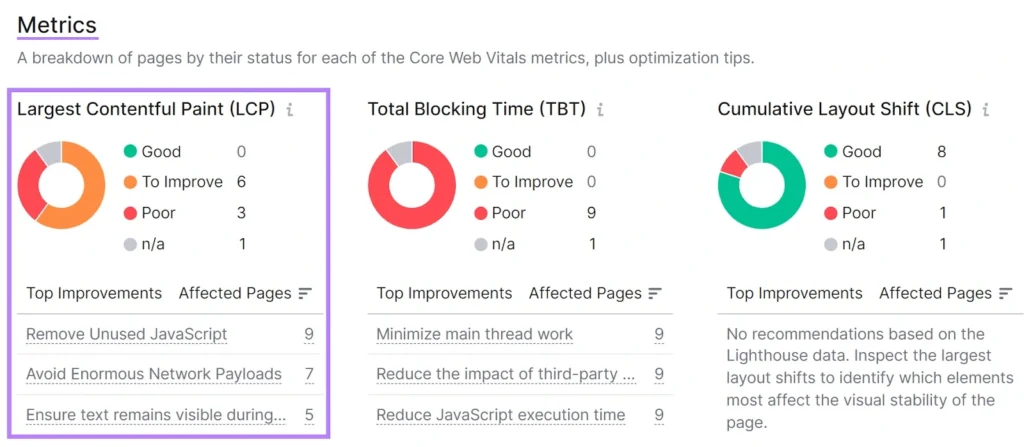
Before we start tweaking settings, we need to know what we’re fighting. Usually, a slow LCP is caused by one of four things: a sluggish server, images that are far too large for their own good, “render-blocking” code that stops the browser in its tracks, or a heavy reliance on client-side rendering.
Here is how you actually fix it in 2026.
Optimize Images for Faster LCP
Images are almost always the culprit for a poor LCP score. If your hero banner is a 4MB PNG, you’ve already lost.
- Next-Gen Formats: Use WebP or, even better, AVIF. AVIF is the gold standard in 2026 and it offers better compression than WebP without making your photos look like a pixelated mess from 1995.
- The “Eager” Trick: You know how everyone says “lazy load everything”? They’re wrong. You should never, ever lazy load your LCP element. Use
loading="eager"andfetchpriority="high"for your main hero image. This tells the browser: “Hey, this is the most important thing on the page, get it now.” - Specify Dimensions: Always set
widthandheightattributes in your HTML. If you don’t, the browser has to wait for the image to download before it knows how much space to reserve. That’s a massive waste of time.
Improve Server Response Time (TTFB)
If your “Time to First Byte” (TTFB) is slow, your LCP will never be fast. It’s like trying to win a drag race in a car that takes 10 seconds just to start the engine.
- Hosting Matters: If you’re still on $5-a-month shared hosting, no amount of optimization will save you. Move to a managed VPS or a cloud-native provider that supports HTTP/3.
- The Power of the Edge: Use a Content Delivery Network (CDN) like Cloudflare or Fastly. By caching your site on servers all over the world, you’re making sure a user in Dubai isn’t waiting for a server in New York to respond.
Eliminate Render-Blocking JavaScript and CSS
When a browser reads your HTML, it stops every time it hits a CSS or JavaScript file. It says, “I can’t show the page until I read this whole file.”
- Critical CSS: Identify the CSS needed to show the top part of your page (above the fold) and inline it directly into the
<head>. - Minify and Defer: Use a tool to strip out all the white space and comments from your code. Then, use the
deferattribute for any JavaScript that isn’t essential for the initial paint. Let the content load first, then let the fancy animations and tracking scripts follow.
Use Preloading and Caching Strategies
There are some things your site just can’t live without like your brand font or that main banner image.
- The Preload Tag: Use
<link rel="preload">in your header for your LCP image and your main font file. It’s basically like giving those files a VIP pass to jump the queue.
WordPress-Specific LCP Fixes
If you’re running on WordPress, you don’t necessarily have to do all of this manually. But you have to choose the right tools.
- NitroPack: This is the “easy button” for 2026. It handles the CDN, image optimization, and even the “Critical CSS” generation automatically. It’s cloud-based, so it does the heavy lifting off-site.
- WP Rocket + Imagify: This is the classic “power stack.” WP Rocket handles the caching and code deferral, while Imagify handles the AVIF conversion. It’s a bit more “hands-on,” but it gives you more control.
Target: LCP < 2.5 Seconds
Your goal is a score of under 2.5 seconds. If you’re at 2.6, you aren’t failing, but you aren’t winning either. Once you implement these changes, head back to PageSpeed Insights and run a “Before and After” test. Honestly, seeing that red bar turn green is one of the most satisfying feelings in SEO.
How to Fix Interaction to Next Paint (INP)
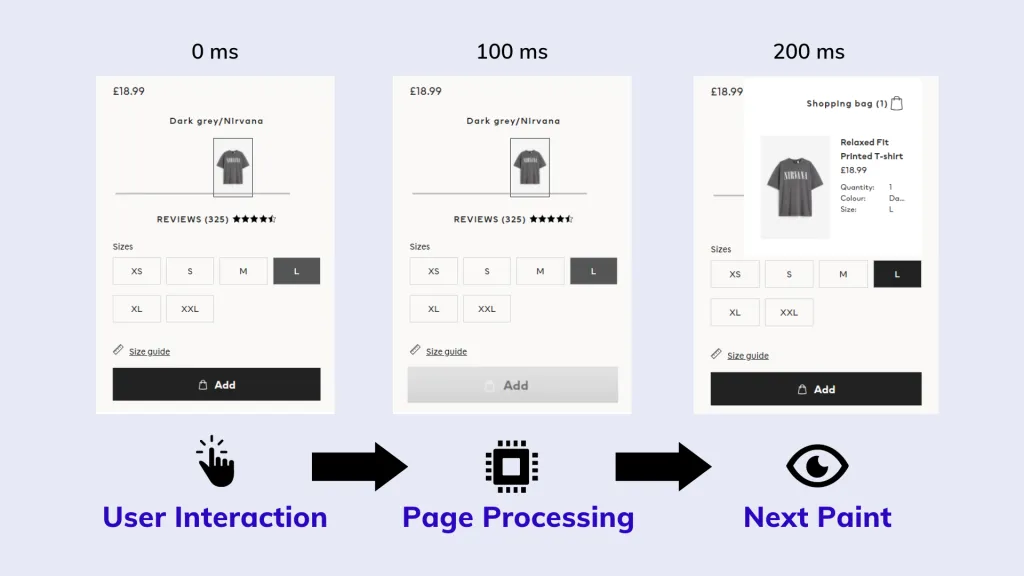
The core issue with INP is almost always JavaScript. When the browser’s “main thread” is busy crunching code for a complex animation or a heavy tracking script, it can’t respond to a user’s click. It’s like a waiter being so busy writing down a massive 20-person order that they can’t even look up to see you waving for the check.
Here is how you make your site feel snappy and responsive again.
Reduce Main-Thread JavaScript Work
A “long task” is any piece of code that takes longer than 50ms to run. When a task runs for, say, 300ms, the browser is effectively frozen for that duration.
- The “Yield” Strategy: Instead of running one massive block of code, you need to break it into smaller chunks. In 2026, we use the
scheduler.yield()API (or asetTimeoutfallback) to tell the browser: “Hey, I’m doing some work here, but I’m going to take a micro-break so you can check if the user clicked anything.” - Identify the Culprits: Open Chrome DevTools, go to the Performance tab, and record yourself interacting with the site. Look for those red-striped blocks, those are your long tasks.
Optimize Third-Party Scripts and Tracking Codes
Honestly, this is where most sites fail. You might have perfectly optimized code, but then you load three different analytics trackers, a “hotjar” heatmap, and a heavy chat widget.
- Audit Your Tags: Do you really need that tracking script from 2022 that nobody looks at anymore? If not, kill it.
- Load Asynchronously: Always use the
asyncordeferattributes. But better yet, use a tool like Partytown to run those third-party scripts in a “Web Worker.” This moves the heavy lifting off the main thread entirely, leaving it free to handle user clicks.
Improve Event Handler Efficiency
If you have a search bar that filters a list as you type, you might be triggering a heavy calculation on every single keystroke.
- Debouncing and Throttling: Don’t let your code run 50 times a second. Use a “debounce” function to wait until the user has stopped typing for 200ms before you update the UI.
- Immediate Visual Feedback: Even if the actual data takes 300ms to process, you should update the UI instantly. If a user clicks a button, show a “loading” state or a color change immediately. This “perceived performance” can help keep your INP within that “Good” range.
4. Prefer CSS for Movement
JavaScript-based animations are notorious for blocking the main thread.
- GPU Acceleration: Use CSS
transformandopacityfor animations. These are handled by the GPU, not the CPU, meaning they won’t interfere with the browser’s ability to respond to a user’s tap.
WordPress-Specific INP Improvements
WordPress sites are prone to poor INP because every plugin adds its own little pile of JavaScript to the main thread.
- Disable the Junk: Use a plugin like Asset CleanUp to prevent scripts from loading on pages where they aren’t needed. Why load a “Contact Form” script on your “About” page?
- Switch to Lightweight Themes: If your theme is a “multi-purpose” monster with 50 different built-in sliders and features, your INP will always struggle. 2026 is the year of minimalist, high-performance themes like GeneratePress or Blocksy.
How to Know You’ve Won
While we aim for a score under 200ms, you can use Lighthouse’s Total Blocking Time (TBT) as a “lab” proxy. If your TBT is low, your INP is likely in good shape. But remember: the only test that truly matters is how it feels on a real phone in the real world.
If LCP is about speed and INP is about snappiness, then Cumulative Layout Shift (CLS) is all about stability.
Honestly, there is nothing more annoying than being halfway through a sentence on a mobile site and having the text suddenly jump three inches down the screen because a late-loading ad decided to pop in.
It makes people want to throw their phones. You know what? Google hates that “jumpy” feeling just as much as your users do. If your site has a high CLS score, you’re basically telling Google that your page experience is unreliable.
Also Read : Best 10 Web Design Trends for 2026 | Future of UI/UX & AI
How to Fix Cumulative Layout Shift (CLS)
CLS issues usually stem from a few specific culprits: images without dimensions, dynamic content like ads or banners that push things around, and web fonts that cause a “flash” of layout changes.
Here is how to lock your layout down so it stays put.
Always Set Width and Height on Images and Videos
The most common cause of layout shifts is the browser not knowing how much space to save for an image before it finishes downloading.
- Always Use Attributes: You must include
widthandheightattributes on your<img>tags. Even if you use CSS to make them responsive later, those HTML attributes give the browser the “aspect ratio” it needs to reserve the space immediately. - The
aspect-ratioTrick: In 2026, we use the CSSaspect-ratioproperty. It’s a lifesaver. By setting something likeaspect-ratio: 16 / 9;, you tell the browser exactly how the box should look, even if the image hasn’t arrived yet. No more jumping content.
Stabilize Ads, Embeds, and Dynamic Content
Ads are the “villains” of CLS. Since they load asynchronously, they often pop in late and shove your content out of the way.
- Reserve the Max Space: Don’t just let an ad container sit at 0px height. Wrap your ads in a
<div>and set amin-heightbased on the largest ad size you expect to show. If a smaller ad loads, it just leaves a bit of white space—which is a million times better than a layout shift. - Avoid Top-Heavy Injections: Never, ever inject a banner, a cookie notice, or a “Join our newsletter” pop-up at the very top of the page after the content has already started rendering. If you have to show a notice, make it an overlay or put it at the bottom.
Prevent Font-Induced Layout Shifts
Have you ever noticed a site’s text changing size slightly a few seconds after it loads? That’s called a Flash of Unstyled Text (FOUT). When your custom brand font finally loads and replaces the system font (like Arial or Times New Roman), it can cause lines of text to wrap differently, shifting the whole page.
- Preload Your Fonts: Use
<link rel="preload">for your main brand fonts. This gets them into the browser’s hands as early as possible. - Use
font-display: swap(with caution): This ensures your text is visible immediately using a system font. However, to stop the shift when the fonts swap, you should use thesize-adjustproperty in your@font-facedeclaration. This allows you to “scale” the system font to match your custom font’s dimensions almost perfectly.
Test for the “Hidden” Shifts
Sometimes shifts happen long after the page has loaded and maybe when a user scrolls or clicks a menu.
- The “Experience” Panel: Open Chrome DevTools and go to the “Performance” tab. Record a session while scrolling and clicking. Look for the “Layout Shifts” markers in the Experience row. It will highlight exactly which element moved and what caused it.
WordPress-Specific CLS Fixes
If you’re on WordPress, you don’t necessarily have to manually edit every single image tag.
- Perfmatters and WP Rocket: These plugins have “Add Missing Image Dimensions” features. You just toggle a switch, and they’ll scan your media and add the width/height attributes for you. It’s a huge time-saver.
- Use Skeleton Screens: If you use a lot of dynamic content, look for themes or builders that support “Skeleton Loading.” This shows a grey placeholder box that matches the final content’s size, keeping the layout rock-solid.
What Success Looks Like
You’re aiming for a CLS score of less than 0.1. Anything higher than 0.25 is considered “Poor” and will likely hurt your rankings. Once you’ve implemented these fixes, your site should feel calm and professional. No more jumping, no more accidental clicks, just a smooth experience.
Once you’ve nailed the basics of LCP, INP, and CLS, you’re already ahead of about 80% of the web. But you know what? To beat the heavyweights like the Neils and the Search Engine Lands then you have to look at performance as a living, breathing part of your brand, not just a one-time checklist.
In 2026, “good enough” is a dangerous place to be. We need to talk about the high-level strategies that turn a fast site into an “instant” one.
Advanced Core Web Vitals Optimization Strategies for 2026
If you want to truly master how to fix Core Web Vitals, you have to stop treating them like three separate problems.
They are all connected. A heavy JavaScript file might hurt your INP, but it also delays your LCP. A slow server response hurts everything. It’s a holistic game now.
1. The “Instant” Experience: Speculation Rules and Early Hints
This is the “secret sauce” for 2026. Have you ever noticed how some sites feel like the page was already there before you even clicked the link? They probably weren’t just “fast” but they were predictive.
- Speculation Rules API: This is a game-changer. It allows you to tell the browser: “Hey, there’s a 90% chance the user is going to click the ‘About’ link next. Go ahead and fully render it in the background.” When they actually click, the transition is literally 0 milliseconds. It’s not just fast; it’s magic.
- Cloudflare Early Hints: While your server is “thinking” and gathering data to send the HTML, Early Hints (HTTP 103) tells the browser which CSS and fonts it’s going to need. It’s like a waiter bringing you water and bread while you’re still looking at the menu. It shaves off those crucial milliseconds from your LCP.
2. Don’t Let Your “Optimization” Break Your Site
I’ve seen this happen way too often. A founder gets obsessed with a 100/100 PageSpeed score and starts cranking the compression up to eleven.
- The Quality Trap: If you compress your hero image so much that it looks like a blurry mess from the 8-bit era, you might pass the LCP test, but you’ll fail the “Trust Test.” Users will leave because the site looks unprofessional.
- The “Lazy Load” Fail: We talked about this before, but it’s worth repeating. Over-optimizing by lazy loading everything including your logo and hero banner will actually tank your LCP score. Honestly, you need to be surgical. Optimize for the human eye first, then the bot.
3. Integration: Core Web Vitals is Just Technical SEO
You can’t optimize performance in a vacuum. It has to play nice with the rest of your technical stack.
- Structured Data: Use Schema markup to help Google understand your content faster. While it doesn’t “speed up” the code, it speeds up the indexing.
- HTTPS and HTTP/3: Ensure you’re running on the latest protocols. HTTP/3 is significantly better at handling the “head-of-line blocking” issues that used to plague older sites, especially on shaky mobile connections.
Automation: Letting the Robots Do the Heavy Lifting
You have a business to run. You can’t spend every waking hour minifying CSS files by hand. You know what? That’s what automation is for.
- NitroPack and WP Rocket: These aren’t just plugins; they are performance engines. NitroPack, in particular, is incredible because it does the heavy lifting on its own servers, so your hosting doesn’t have to work as hard.
- Edge Computing: Using Cloudflare Workers to modify your HTML at the “edge” (the server closest to the user) can fix things like missing image dimensions or adding preconnect tags without you ever touching your WordPress theme.
The “Set It and Forget It” Myth
The biggest mistake I see? Fixing your Core Web Vitals once and then never looking at the report again.
- Search Console Alerts: Set up your Google Search Console to send you an email the moment your “Good” URLs start dropping into the “Needs Improvement” bucket.
- Regular Audits: Sites grow. You add new blog posts, you install a new tracking pixel for an ad campaign, or your theme gets an update. Every one of these things can break your performance. I recommend a deep dive audit every single month.
Honestly, the goal isn’t just to “pass.” The goal is to create an experience so smooth that the technology disappears and the user just focuses on your content. That’s how you win in 2026.
We’ve covered a lot from the technical “how” of image compression to the deep-seated “why” of Google’s search philosophy.
But you know what? At the end of it all, Core Web Vitals are really just about one thing: respect. Respect for your user’s time, their data plans, and their sanity while they browse your site.
Honestly, if you’ve made it this far, you’re already miles ahead of the competition. While everyone else is still debating keyword density or trying to find a “secret” backlink hack, you’re building a foundation that actually lasts. You’re making your site faster, cleaner, and a whole lot more stable.
A Quick Reality Check on Your Numbers
Before you close this tab and get back to your day, let’s recap the three big targets we’re aiming for in 2026:
- LCP (Largest Contentful Paint): Keep it under 2.5 seconds by being smart about your hero images and server response.
- INP (Interaction to Next Paint): Aim for 200 milliseconds or less by breaking up heavy JavaScript tasks.
- CLS (Cumulative Layout Shift): Stay under 0.1 by reserving space for everything—especially those pesky ads.
It sounds simple when you list it out like that, doesn’t it? But as we’ve seen, the magic is in the details. It’s about preloading the right fonts, choosing the right hosting, and making sure your mobile users aren’t left in the dust.
Future-Proofing Your Growth
Google is going to keep changing the rules. They always do. We’ve already seen FID get swapped out for INP, and I wouldn’t be surprised if new metrics pop up as AI-driven search becomes the norm. But the core principle won’t change. A fast, stable site will always be a priority.
By staying on top of your Search Console reports and running regular audits, you aren’t just “fixing” a problem. You’re building a high-performance asset.
You know what? In a world where everyone is using AI to flood the internet with “okay” content, a site that actually feels premium because it loads instantly is your ultimate competitive edge.
Your Move: Audit Today, Rank Tomorrow
Don’t let this be just another article you read and forget. Go to PageSpeed Insights right now. Plug in your URL. See where you stand. If you’re in the red or yellow, don’t panic just pick one thing. Maybe it’s fixing your image dimensions today. Maybe it’s setting up a CDN tomorrow.
The goal isn’t to be perfect by tonight; it’s to be better than you were yesterday. By mastering how to fix Core Web Vitals, you’ll secure top rankings and drive sustainable traffic in 2026. You’ve got the tools, you’ve got the plan, and you’ve definitely got the expertise now.
Let’s get those scores into the green.
Frequently Asked Questions (FAQs)
Even after you’ve cleaned up your codebase and optimized every last image, a few questions usually linger. Performance isn’t always a straight line, and honestly, the “SEO rules” can feel like they’re written in pencil sometimes. Let’s clear up the most common points of confusion I hear from founders and developers alike.
What are the current Core Web Vitals thresholds in 2026?
Google hasn’t moved the goalposts much in terms of the actual numbers, but they’ve definitely tightened the way they measure them. To stay in the “Green” (Good) zone this year, here is your target:
LCP (Largest Contentful Paint): Under 2.5 seconds.
INP (Interaction to Next Paint): Under 200 milliseconds. (Remember, this completely replaced FID in 2024).
CLS (Cumulative Layout Shift): Under 0.1
How long does it take to see SEO improvements after fixing CWV?
Honestly, it’s not an overnight switch. Since Google relies on CrUX (Field Data), they need a 28-day rolling window of data from real users to confirm that your site is actually faster.
Once those 28 days pass and your Search Console report turns green, you’ll typically see the ranking impact within one to two weeks. Think of it as a slow build rather than a sudden spike. Google wants to make sure your “fast” site isn’t just a fluke.
Are Core Web Vitals more important for mobile or desktop?
In 2026, mobile is the only game that matters for most of us. Google uses mobile-first indexing, which means they judge your site based on how it performs on a smartphone, even if your desktop version is lightning-fast.
If your desktop LCP is 1.2s but your mobile LCP is 3.5s, Google considers you a “failing” site. Always, always prioritize your mobile scores first. If you win on mobile, you usually win on desktop by default.
Can I pass Core Web Vitals without coding knowledge?
Yes, you can especially if you’re on a platform like WordPress. Tools like NitroPack or the WP Rocket + Imagify stack are designed to do about 90% of the heavy lifting (like image compression, caching, and code minification) automatically.
However, if you have a massive layout shift caused by a poorly coded theme or a specific custom widget, you might need a developer to spend an hour or two tweaking the CSS. But for the vast majority of sites, modern automation tools are enough to get you into the green.
What if my site still fails after all these optimizations?
If you’ve optimized your images, deferred your JS, and you’re still seeing “Poor” scores, the problem is almost always your hosting.
If your server takes 1.5 seconds just to respond (TTFB), you’ve already used up more than half of your LCP budget before the browser has even seen a single line of code. Honestly, no amount of plugin magic can fix a slow, cheap server. In 2026, if you want to rank, you need a host that supports HTTP/3 and has solid server-side caching.