

A business owner puts their heart and soul into a website, only to watch their traffic flatline while competitors (who aren’t even doing anything revolutionary) stay pinned to the top of page one.
It’s rarely because of some mysterious algorithm update or a lack of “AI magic.” Most of the time, the culprit is a handful of simple, fixable issues hiding in plain sight.
This is exactly why a traditional SEO health check is still the most valuable tool in your kit for 2026. While everyone else is busy chasing the latest flashy bot, the sites that actually rank are the ones that haven’t ignored the basics.
Let me explain. A traditional audit isn’t about running a hundred expensive crawlers, actually it’s a manual, foundational review of how your site actually functions.
We’re talking about using free tools like the stuff Google gives us for nothing to check your crawlability, on-page settings, and whether your site feels like a clunky relic or a smooth experience for a real person.
Why bother with the “Traditional” stuff?
Google still uses these “old school” signals to decide if you’re trustworthy. By spending a few minutes looking under the hood, you can spot those quick wins that move the needle.
Maybe your images are so heavy they’re killing your load speed, or perhaps you’ve accidentally told Google to ignore your best service page.
A quick traditional SEO health check helps you avoid those “silent” penalties and gives your rankings the boost they need without needing a degree in computer science.
Whether you’re a total beginner or a founder who’s just too busy to spend hours on spreadsheets, this guide is for you.
I’m going to show you how to audit your site in under 30 minutes. No fluff, no “best practices” filler, just a timed, step-by-step sprint that works.
Also Read : 10 Proven LLM SEO Tips to Optimize for ChatGPT & Google AI
Why Do a Traditional SEO Health Check in 2026?
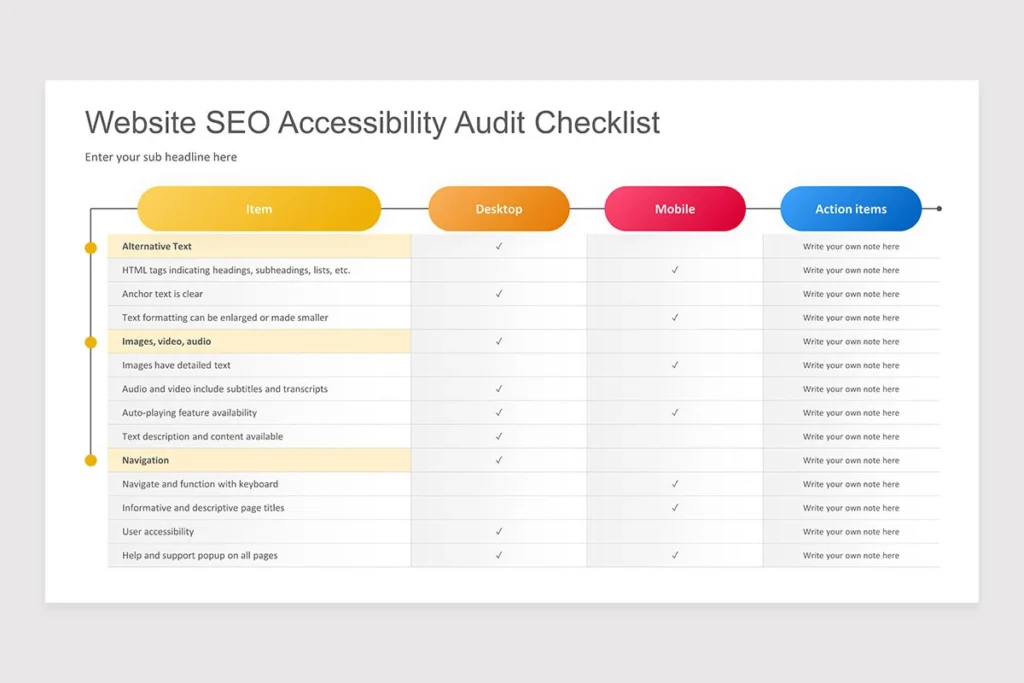
You might be wondering why we’re sticking to the “basics” when the internet is buzzing about generative search and AI-driven content. Honestly, it’s because search engines haven’t actually changed their core mission.
At the end of the day, Google wants to send people to sites that are easy to crawl, lightning-fast, and don’t make the user want to throw their phone across the room.
If your foundation is shaky, all those advanced tactics you’re planning? They’re just expensive decorations on a house built on sand.
A quick SEO health check is your early warning system. It’s the difference between catching a small indexing glitch today and waking up next week to find your organic traffic has fallen off a cliff.
Think about it like a regular oil change for your car and it’s not flashy, but it’s what keeps the engine from seizing up on the highway.
The Real-World Impact
Let’s talk numbers for a second, but I’ll keep it simple. We know that “Core Web Vitals” those metrics that measure how fast your page feels have a massive influence on where you land in the search results.
With mobile searches now making up the vast majority of web traffic, if your site feels “heavy” or jumps around while loading on a smartphone, you’re effectively invisible to most of your audience.
Also Read : Programmatic SEO in 2026: The Best Guide to Scaling Traffic
I’ve seen plenty of sites try to skip the “boring” stuff to focus on complex link-building schemes. But if Google’s bots can’t crawl your pages because of a messy technical setup, those links aren’t going to save you.
By focusing on a SEO health check, you’re ensuring that when you finally do the “advanced” stuff, it actually has a platform to succeed on.
It’s about being smart with your time. Why spend weeks on a strategy that’s doomed to fail because of a simple 404 error you could have fixed in thirty seconds?
Essential Free Tools for a SEO Audit (No Downloads Needed)
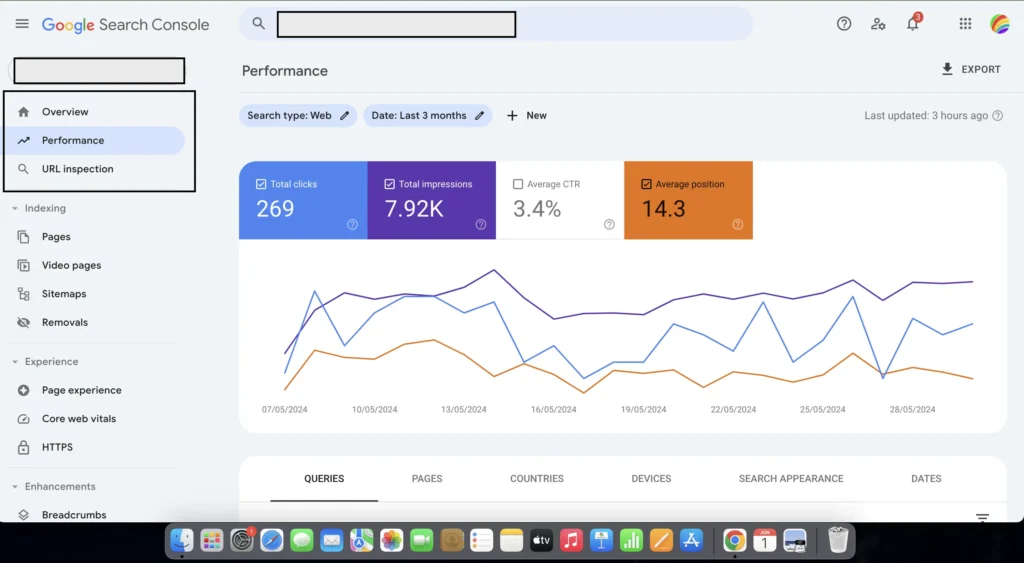
Before we start the timer, you need to have your gear ready. Now, I’m not talking about some massive software suite that costs more than your monthly rent.
Honestly, the beauty of a traditional SEO health check is that most of the heavy lifting is done with tools that are completely free. You don’t even need to download anything bulky.
Google actually wants your site to be healthy. Why wouldn’t they? It makes their job easier. So, they provide some of the best diagnostics on the planet for zero dollars. Let’s get your tabs open so we don’t waste a single second of our thirty minutes.
The “Big Three” and a Few Helpers
- Google Search Console (GSC): This is the holy grail. If you aren’t using Google Search Console, you’re basically flying a plane blind. It tells you exactly how Google sees your site, which pages are indexed, and more importantly which ones are being ignored. It’s like having a direct line to the person grading your exam.
- Google PageSpeed Insights: Everyone talks about speed, but this tool gives you the “why” behind the “slow.” (By the way, did you know Google folded the old Mobile-Friendly Test into their other tools? It’s all about the Page Experience now, so this is where you’ll see if your mobile site is actually working).
- Your Web Browser (Chrome): Specifically, those “Inspect” tools. You don’t need to be a developer to use them. Right-clicking and hitting ‘Inspect’ lets you see exactly how your site’s code is structured in a heartbeat. It’s a bit like looking at an X-ray of your website.
- SEO Minion (Optional): I personally love this little browser extension. It’s great for a quick look at your titles and meta descriptions without digging through your dashboard. It saves a ton of clicking around.
You know what? Most people overcomplicate this. They think they need “enterprise-grade” software to see if their H1 tags are missing. Spoiler alert: you don’t. These tools are more than enough to get you to the first page.
Also Read : What is Topical Authority? Strategy For Semantic SEO in 2026
Your 30-Minute Traditional SEO Health Check Checklist
Alright, the clock is officially ticking. We aren’t here to over-analyze every single pixel but we’re here to find the “leaks” that are draining your rankings.
I’ve broken this down into timed segments so you can actually get it done before your next meeting. Honestly, once you do this a few times, it becomes second nature like checking your mirrors before pulling out of the driveway.
Minutes 0–5: Verify Indexing & Crawlability
First thing’s first: Is Google even invited to the party? If your pages aren’t indexed, you don’t exist in search. It’s as simple as that.
- The “Site:” Trick: Head over to Google and type
site:yourdomain.cominto the search bar. This gives you a quick-and-dirty look at what Google has on file. If your homepage is missing or you see half the number of pages you actually have, we’ve got a problem. - The Deep Dive in GSC: Open Google Search Console and go to the Pages report. Look for those scary red bars. Are there pages “Excluded” that should be “Indexed”? Pay close attention to “Blocked by robots.txt.”
- The Gatekeeper: Speaking of which, go to
yourdomain.com/robots.txt. You don’t need to be a coder to read this. If you seeDisallow: /at the top, you’re basically telling Google to stay away from your entire site. I’ve seen this happen after a site redesign more times than I care to admit.
Quick Fix: If you realize you’ve forgotten to tell Google about your site, just submit your sitemap URL in GSC. It’s like sending a formal invitation to the crawl bots.
Also Read : Create a Winning SEO Roadmap in 2026 With Expert’s Way
Minutes 5–10: Check Site Speed & Core Web Vitals
You know that feeling when a site takes forever to load and you just hit the “back” button? Yeah, Google hates that too.
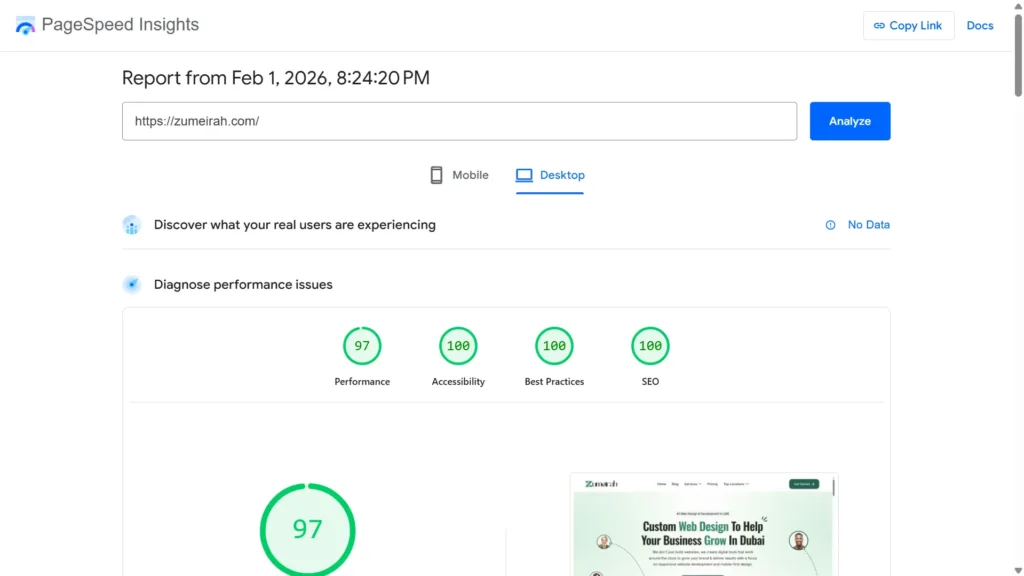
Run your homepage and your most important service page through Google PageSpeed Insights. You aren’t looking for a perfect 100/100 because that’s a vanity metric. You’re looking for “Healthy” scores (aim for 80+) and specifically your Core Web Vitals.
- LCP (Largest Contentful Paint): This should be under 2.5 seconds. It’s basically how long it takes for the main part of your page to show up.
- CLS (Cumulative Layout Shift): Ever tried to click a button and the page jumps, making you click an ad instead? That’s CLS. Keep it under 0.1.
If your score is in the gutter, the usual suspects are massive, unoptimized images or too many “heavy” scripts running in the background. Honestly, just compressing your photos can sometimes shave seconds off your load time.
Minutes 10–13: Test Mobile-Friendliness & HTTPS
If your site doesn’t work on a phone in 2026, you’re losing more than half your audience.
- Mobile Test: Use Google’s testing tools to ensure your text isn’t microscopic and your buttons aren’t so close together that a human thumb can’t click them.
- The Lock Icon: Check your URL. Does it have the little padlock? If it says “Not Secure,” you’re scaring away customers and search engines alike. Make sure your site automatically redirects anyone who types in
httpto the securehttpsversion. It’s a small detail, but it’s non-negotiable for trust.
Minutes 13–20: On-Page SEO Basics Scan
This is where we look at the “labels” we’re giving Google. If your labels are messy, the engine gets confused.
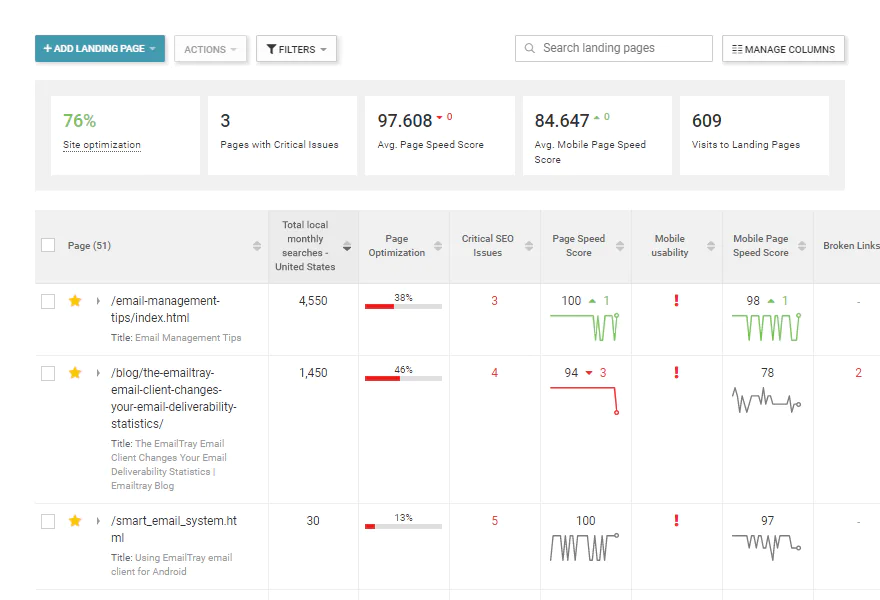
- Titles & Metas: Your title should be under 60 characters and put the most important keyword first. Think of it like a book spine so it needs to be clear. Your meta description (the text below the link) should be a “hook” that makes people want to click.
- The H1 Rule: You should only have one H1 tag per page. It’s the title of your article or page. Using three or four is like trying to have four different names; it just doesn’t work.
- Alt Text: Don’t leave your images “blind.” Add descriptive alt text so Google knows what the photo is about. But please, don’t just stuff it with keywords. Describe it like you’re explaining the picture to a friend over the phone.
- Clean URLs:
zumeirah.com/seo-auditis great.zumeirah.com/p=123?category-id-99is a nightmare. Keep them short and readable.
Also Read : Traditional SEO vs. AI SEO: Best Way for #1 Rankings in 2026
Minutes 20–25: Quick Content & UX Review
Take a step back and look at your site like a first-time visitor.
Is the content “thin”? If a page only has 100 words of generic text, why would Google rank it? You want meat on the bones.
Also, check for internal links. Every page should point to 2–5 other related pages on your site. It’s like building a map for the reader to follow.
And for the love of all things holy, check if you have an intrusive pop-up that blocks the entire screen the second someone arrives. That’s a one-way ticket to a high bounce rate.
Minutes 25–30: Backlinks & Authority Snapshot
Finally, let’s see who’s talking about you. Use a free backlink checker to see your “Domain Rating” or “Authority.”
Also Read : Increase Your Domain Authority in 2026: 10 Proven Strategies
You don’t need thousands of links, but you do want high-quality ones. If you see a bunch of “spammy” links from sites that look like they were built in 1995, you might need to disavow them in GSC.
The Wrap Up: Look back at what you found. Don’t try to fix everything at once. Pick the top 3 issues so maybe it’s a slow LCP, a missing H1, or a blocked page and fix those first. That’s how you actually get results without losing your mind.
Next Steps After Your 30-Minute Audit
You’ve finished the sprint. Your coffee is likely still warm, and you now have a list of exactly what’s holding your site back. But honestly, a traditional SEO health check is only as good as the action you take afterward. It’s like going to the doctor; getting the diagnosis is great, but you actually have to take the medicine to get better.
Here’s how I suggest you handle the “aftermath” of your 30-minute session.
Prioritize Like a Pro
Don’t try to fix everything in one afternoon. You’ll burn out, and honestly, some things matter way more than others. If you’re staring at a long list of “to-dos,” follow this hierarchy of importance:
- Indexing & Crawlability: If Google can’t find your pages, nothing else matters. Fix these first.
- Site Speed: A slow site kills conversions. Get those images compressed and your LCP down.
- On-Page Basics: Once the technical stuff is solid, go back and polish your H1s and meta descriptions.
Monitor the Pulse
Once you’ve made a few tweaks maybe you submitted a new sitemap or fixed a “redirect loop” so don’t expect rankings to jump overnight. Keep an eye on your Google Search Console reports.
You want to see that “Indexed” number climbing and those “Error” bars shrinking. It’s a slow burn, but it’s the most satisfying trend line you’ll ever see.
Make it a Habit
The biggest mistake I see is the “one and done” approach. Search Engine Optimization isn’t a destination like it’s a maintenance routine. I highly recommend scheduling a traditional SEO health check once a month.
It only takes 30 minutes, but it ensures that a small plugin update or a stray line of code doesn’t accidentally tank your hard-earned rankings while you aren’t looking.
When to Call in the Big Guns
Sometimes, you’ll find an issue that a 30-minute manual check can’t solve. If you’re seeing massive traffic drops you can’t explain, or if your site has thousands of pages that seem to be “haunted” by technical glitches, that’s when it’s time to go deeper.
A full, professional-grade crawl and a comprehensive strategy are what you need when you’re ready to scale past the basics and truly dominate the first page.
Traditional SEO Health Check FAQs
Honestly, I get a lot of questions about this at Zumeirah. People often feel like they’re “falling behind” if they aren’t using the newest, shiniest AI tools. Let me clear up a few things so you can move forward with total confidence.
What is the difference between traditional and modern SEO audits?
Think of a traditional audit as the “physical exam” for your website. It focuses on the concrete, foundational elements like whether Google can actually read your pages and if your site is fast. Modern audits (or GEO audits) often focus on things like “Brand sentiment” and how LLMs summarize your content. You can’t win at modern SEO if your traditional foundation is broken. It’s like trying to build a smart home on a cracked foundation.
How often should I do a quick SEO health check?
I recommend a “sprint” audit once a month. It only takes 30 minutes, but it prevents small issues like a broken link or an uncompressed image from snowballing into a major traffic loss. If you’re pushing out new content every week, you might even want to check your indexing every Friday afternoon.
Can I do this without technical skills?
Absolutely. You don’t need to be a developer to look for a green padlock icon or to see if your text is too small on a phone. The tools I mentioned, like GSC and PageSpeed Insights, are designed to give you “Pass/Fail” grades. If you can read a report card, you can do a traditional SEO health check.
Why focus on traditional methods in 2026?
Because the “basics” are actually the rules of the game. Even in 2026, Google’s primary goal is to provide a good user experience. A fast, secure, and well-structured site is the definition of a good experience. While everyone else is getting distracted by “hacks,” you’re winning by simply being the most reliable site in the search results.
Do these “quick fixes” actually help me rank higher?
Fixing a slow page or a missing H1 doesn’t just “please the bot” it keeps people on your site longer. When Google sees that users aren’t immediately hitting the “back” button, they realize your site is valuable. That’s the real secret to climbing the rankings.
Is Google Search Console really better than paid tools for this?
For a health check? Yes. Paid tools are great for competitive research, but GSC is the only tool that gives you data directly from the source. It’s the “official” word on your site’s health. Why guess what Google thinks when you can just ask them?